Show off your setup! What's your vibecoding setup like?
Mine: Mac studio (main dev), MBA M1, Claude Max, Codex, Gemini (rare). iPad for testing, with handoff (screenshots + apple pencil) for pointing out issues. Wish handoff worked better cos I'm screenshotting rather than copy pasting. I have a digital piano on my desk for testing the audio/midi part of my app. Wispr Flow for dictation, with apple earphones as a mic. Bose speaker for occasional music. Obsidian for notes (though it's a bit flaky, but notion costs $$). Nightly QA skills, deploy to iPad (wired connection) & mac for testing manually. Real users testing + feedback on a daily basis.
Nothing crazy on the development side. Was using worktrees left and right till I saw how much space it was eating up so now I"m a bit more conservative.
Need suggestions on marketing campaign apps/connectors please (incl. emails, tweets, posts, videos - the whole shebang).
One thoughtful comment that is not AI-assisted unlocks the ability to create threads.
33 comments
One of the key goals we have is cost controls. The below is coding done exclusively using subscriptions. The large coding token usage is absorbed by Minimax's huge token allotment, allowing me to leverage Claude for high-reasoning things.
--- Claude Max x20 subscription Minimax Max subscription (legacy) ---
Architect plans in Claude Code with Opus 4.8. For precise plans that don't drift into "Give me the keys! I know better than you!" Opus 4.8 seems more constrained than Fable or Opus 5.5, both of which go beyond what I want and into what they think I want.
Once the plan is in place, I go to Minimax M3, which codes it with a prompt saying to provide a summary and concerns.
I then take the M3 coding back to Opus 4.8, which assesses the code and QA's it. It is not uncommon for M3 to find flaws or gaps in the 4.8 plan and address them.
I then have Opus 4.8 fix any flaws and proceed to testing.
The above is incredibly cost-effective and very efficient as it's rare for M3 to drift off the Opus 4.8 plan. API cost is zero.
Opus 4.8 actually seems to use more tokens than 5.5, mirroring its model card. But broadly speaking, the heavy token usage is on MiniMax, and it wastes a ton with reasoning, but the monthly limit is 5+ billion tokens, so it barely registers. The QA coding Opus 4.8 does is generally minor as, despite its reputation as a core coding model being less than great, MiniMax is extremely good at following detailed Opus plans.
But to answer your question, I generally run close to my limit an hour or two before the weekly allowance is up, and at that point I just move to the $200/month API allotment you get to fill in.
I'm using the legacy Max plan (no longer offered). It is essentially unlimited (5+ billion tokens a month). The new M Plan has no published token limit, but from what I gather online the M Plan "Explore" tier is a little lower (4-5 billion tokens/month).
One pro tip that very few seem to realize: MiniMax supports subscription token usage for applications and scripts that other platforms deny as they require pay-as-you-go API usage for them.
I've developed a pretty cool custom harness to replace Claude Desktop/Codex/CLI usage. It's basically a much more featured version of the Claude desktop app that allows different providers' agents to talk to each other (Codex to Claude for example, billed via API) as well as intelligent prompt routing through the system for faster responses and better subagent orchestration, and automatic dispatch of sessions onto my beefy Linux desktop via tmux (abstracted).
I mostly started it because I wanted a certain aesthetic, and it's evolved a lot since then and has allowed me to replace VSCode/Kitty/Claude Desktop/Claude Code/Codex with one application.
Majority of the app is in Rust and uses Ghostty under the hood!
Just the Claude Code desktop app for me, I like it a lot better than the CLI. It organizes sessions better and automatically handles worktrees under the hood.
Marketing setup is super barebones, I use AWS SES + vibe coded dashboard to send daily digests and email alerts and then browser use for everything else, basically just tell Claude “go do X for me, control my browser”.
Mine is a terminal with 4-5 tmux panes per session (2-3 Claudes, Codex, agy/Grok/etc for diversity), tmux has very minimal visual candy with basic color and name separated tabs, 2-3 tabs overall
It is very simple setup, doesn't depend on HW, and I can run it from anywhere (Tailscale) and pretty much anything without losing in performance
My Steam Deck OLED is both my dev machine and the platform we ship for. I'm building a 2D battler/tower-defense/roguelike entirely on the Deck in Unity 6 with URP 2D. It has hand-drawn B&W line art, tons of units and one-finger touch controls. I handle tech/AI and work with a designer and an artist.
With a monitor, keyboard and mouse, the docked Deck is a perfectly good Linux dev box. I test on the same hardware players use.
Rest of the setup:
2017 Intel MacBook Pro (dying, 16 GB): I use it for Discord, OpenCode and Claude Code. It's also my SSH hub for the VPS boxes. It doesn't run Unity (the Intel Mac editor is deprecated at 6.7 LTS).
Contabo VPS: Runs a self-hosted GitHub Actions runner for Unity builds. A Linux build and a headless Recorder clip take about 6 minutes per run.
Hetzner CX22: Hosts Hermes and the agent loop and handles CI dispatch.
I use OpenCode locally on the Deck for coding and Claude Code on the Mac for heavier thinking. My npm tool, agent-looper, drives fix-until-green loops. What makes agents workable in Unity is that everything is text-serialized (Force Text, ScriptableObjects/JSON). The agents edit data and never touch scenes.
Builds and tests run headless. CI posts a review.webm clip to our Discord #dev channel so we can see that the game still runs. CI also refreshes the Unity Personal license automatically. The license is bound to the runner and never goes in the repo.
We keep notes in an Obsidian vault synced over git, use PRs with conventional commits for changes, and track issues on GitHub.
Does anyone else run Unity on a Deck or self-host runners to save on Actions minutes?
If you can afford it, upgrading to a MacBook with an Apple M-Series chip felt like stepping into the future the speed up was insane.
Edit: Wow my own comment got flagged by my AI detection system :(
Current hardware setup:
MBP 16” M5 Pro, 48 GB of RAM
34” UW monitor
27” monitor
Software
Claude Code
OpenAI Codex (for adversarial reviews)
Tmux
Git
Garry Tan’s Gstack agent framework
VS Code
Subscriptions
Claude Max 20x
OpenAI Pro
GitHub for teams
3 GrapheneOS Pixel phones (I try not to spend too much time at actual computers/laptops) Our Test machines for UCOS 2012 ProBook and 2012 Asus K55A. 3 Mini PC's, a 2017 Zenbook, 2015 HP desktop, a Dell G7 Gaming laptop, Zimablade (Gitea & Garage), Foggie Max (NixOS Binary cache), a Pi4, a few VPS's Everything running NixOS though the VPS's Debian 13 with system-manager. Claude Ultra, ChatGPT $100 whatever that's called. Termux ssh --> Tmux Claude Code. Claude desktop for coder Design seat sessions who can read the bare git repo (no building or pushing to main just branches. Multiple Coder sessions on different machines that merge the Design seats' branches and 1 Codex session.
Laptop: Gigabyte AERO 16 XE5 OS: Omarchy! (absolutely amazing, check it out here, https://omarchy.org/) Dictation: Superwhispr running a local model Task Management: Notion & Physical paper Terminal: Ghostty, Bash, Tmux Editors: Primarily VS Code and Zed, occasionally Neovim AI Setup:
Herdr for controlling several agents, it also has a really nice feature where it lets an agent like Claude Code spawn other types of subagents running in a different harness like Opencode/Pi
Pi + Sonnet/Opus for quick questions
Claude Code / Opencode for long running tasks
I currently have Claude Pro and ChatGPT Plus, but I also use Opencode's free models for quick tasks
Well - I do a lot of local AI agent testing and testing of new models, so for me:
MacBook Pro M4 Max 128gb
MacBook Pro M3 Max 64gb
MacBook Pro M4 Pro 64gb
MacBook Pro M4 Pro 48gb
(Yes I use all 4 running models at the same time)
4 27" displays (2 for my main 128gb MBP)
Claude Desktop (mainly in code mode) since I have gotten away from VS Code for the most part finally (and what a memory hog it was.. sheesh).
I use my iPad and phone with Claude Duet for a personal agent but also for Claude Code remote so I can keep my coding sessions going.
Outside of work, I use a maxed out M1 Max with Claude Ultra, Gemini Ultra, and Codex Max. Also the cheapest Grok Bot sub to try it out, but I probably won't renew.
I actually found my setup simplifying greatly after AI agents. No more monitors, just my laptop + phone. I just type in Google Docs and Apple Notes. If I have some goal, I have a template for database + MCP setup for things that benefit from structured data + AI CRUD for that goal (like if I want to save content online for later research or if I want to work on some creative projects like a fiction book I'm writing, so I put in ideas and stuff).
Just the Claude Code CLI, with several projects running in parallel. I usually limit it to three or four: three complex projects and one relatively simple one. I remember reading somewhere that our short-term memory can hold seven plus or minus two items, and I try to intuitively model my working sessions around that.
For marketing, I haven’t done a lot of demand gen lately, but for brand work, I’ve had some success getting Claude Code to design custom typefaces, color palettes, and such based on a design direction document I’ve created.
Super basic for me. I use the Claude Code desktop app. For complex or long term projects I use sub-chats to handle specific tasks. My main machine is my M4 MBA and I also use a Linux box in my server closet for long running tasks at the office and a Windows PC at home for things that only work on Linux (some line of business apps).
My deployment stack is more important. Deployed apps all run through Kamal, which makes rollovers and updating dead simple.
I've been enjoying building my own daily-driver AI tools. I made it look like a classic Borland IDE for fun. https://github.com/mightystudios/TurboPilot
For hardware, I'm using an HP OMEN i9, 64GB, 3090 24GB as my daily dev box with local AIs hosted on twin AMD Strix Halo 128GB mini-pcs serving Qwen3.8-Flash-Next and ComfyUI instances for content generation. The Strix Halo boxes have allowed me to keep cloud spending in check. I can use a frontier model to define a detailed plan and then let the local models implement with the frontier providing oversight. TurboPilot manages the whole process.
I have similar setup to @dan's but also I have a Slack bot (Claude Code on an ec2 with my repo checked out) that I use on the go to pick up tasks from the backlog
M5 Pro Mac mini 64gig M4 Pro Mac mini 48 gig(not shown) hardwired to my router for Dev work. IPad Pro 65" screen 55" screen Aris Code Desktop Claude Code Desktop, CLI is meh for me.
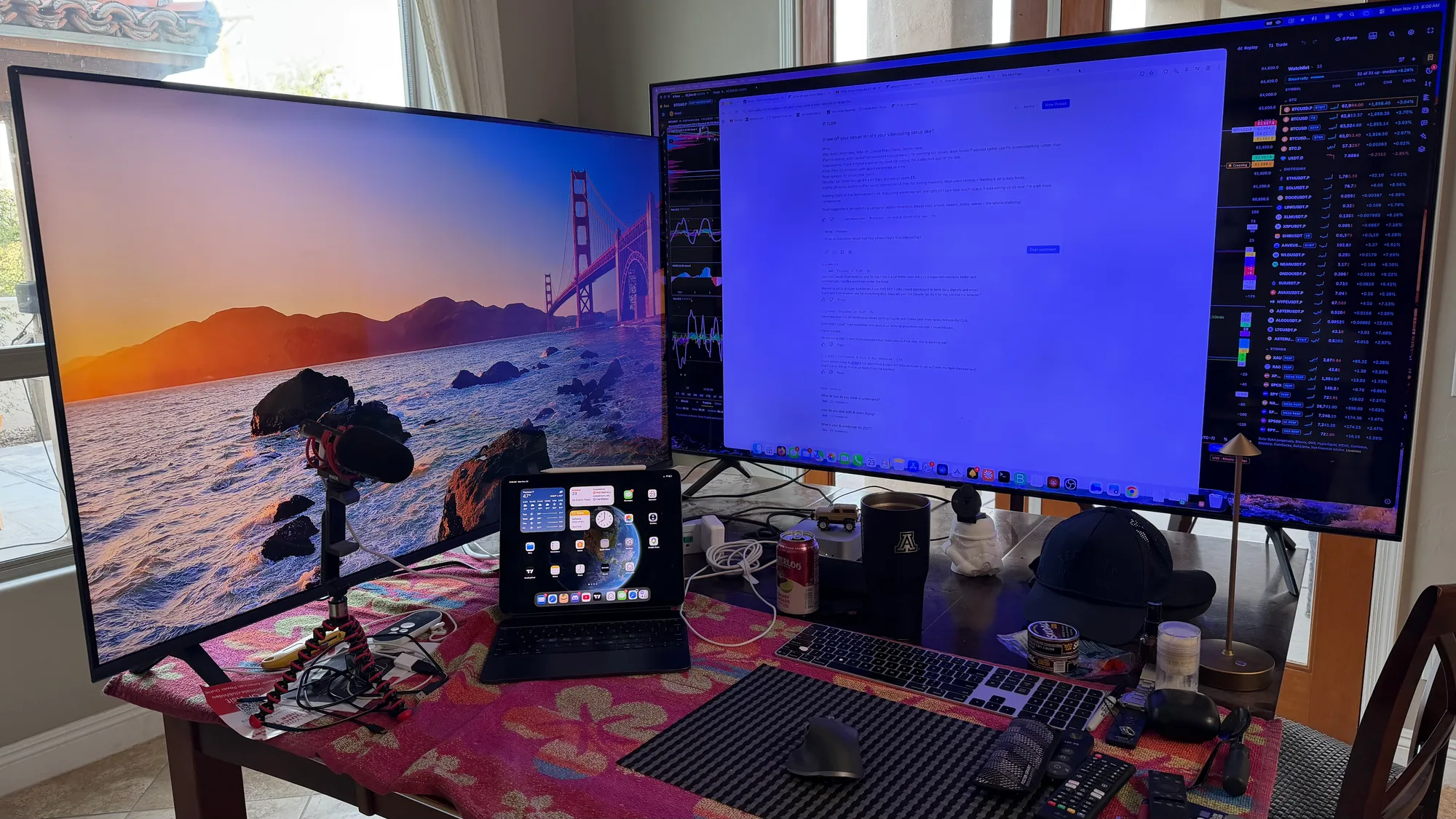
Cool! What do you put on the left monitor? I've never stuck with any setup that required turning my head.
I wrote in more detail here (chicagobuss.dev) about this recently but I do have quite the home fleet of hardware and software at this point.. and my custom paseo re-write crusteo (chicagobuss.dev) is the standard command-center app (along with its mobile companion webapp skiff) to actually do almost everything from.
For Hear You Soon, I switched from cloud agents to Orca, a local app that runs Claude Code using my existing subscription.
When I ran agents locally on HerdLog, parallel test runs kept crashing my dev machine. It’s like your worktrees filling the disk: a few tasks that are each reasonable on their own bring the machine down when agents run them at the same time. Now my build prompt tells the agent to monitor CPU and memory, and CI runs vitest with --maxWorkers=2.
I use Blacksmith runners for CI. Their startup program gives you 10,000 credits a month and 50% off, which goes a long way when agents push a lot of builds.
Mac mini running most of my remote sessions
MacBook Pro for daily work
Tailscale + herdr + Moshi for keeping the devices and sessions synced and do run some agents from my phone. This week I'm going to test T3 code to compare.
Super whisper with open model for dictation
Obsidian for notes and keeping them in sync through iCloud on all devices
Claude Code 5x + Codex pro