How a Robot Goes from Demo to Every Shift
· Ali Aminian, Staff ML Engineer at Adobe
Sponsored
Five million industrial robots now work in factories around the world. Most are arms bolted to the floor, repeating programmed motions with high precision. That precision comes from real-time motion control, and much of it runs on Intel processors, as it has for decades. A computer reads every joint and corrects every motor hundreds or thousands of times per second, and it must never be late. These robots can only repeat a fixed program. When the work changes, an engineer has to update the program.
That is starting to change. With physical AI, the same intelligence behind today's chatbots and agents is reaching robots. Frontier models look at camera images and decide how the robot should move. Instead of a fixed program, the robot runs a model trained on human demonstrations, so it can handle variations that nobody programmed, or could program, in advance. Robots with physical AI are much more capable than earlier robots. That is why their demos now fill conference stages and social media feeds.
Most of them, though, only work in demos. Robot demos are everywhere. Robots that work every shift are not. Leaders expect that to change soon. In Intel's Robotics Readiness Gap survey of 800 senior leaders, six in 10 expect to run a fleet of robots within five years. In the same survey, 77% say reliability and performance matter more than how a robot looks.
Getting there is hard, because physical AI adds to real-time motion control instead of replacing it. The robot keeps that control and gains an AI workload that needs much more compute to do much more work. That compute has to fit the battery, survive heat and dust, meet strict deadlines, and still be affordable. The robot also has to learn each new site and handle safety rules and fleet updates. A demo rarely tests any of these demands. Teams that put them off often have to redo the design later.
Intel, with more than 40 years in production robotics, knows these demands well. It has helped customers deploy many of the robots that work in factories today. This article shares the lessons from that experience in three sections:
- What's inside today's demo robots
- What changes in production
- Why a shared platform is important
Throughout the article, our example is a mobile robot with a small arm that carries parts to stations on a production line. Let's get started!
What's Inside Today's Demo Robots
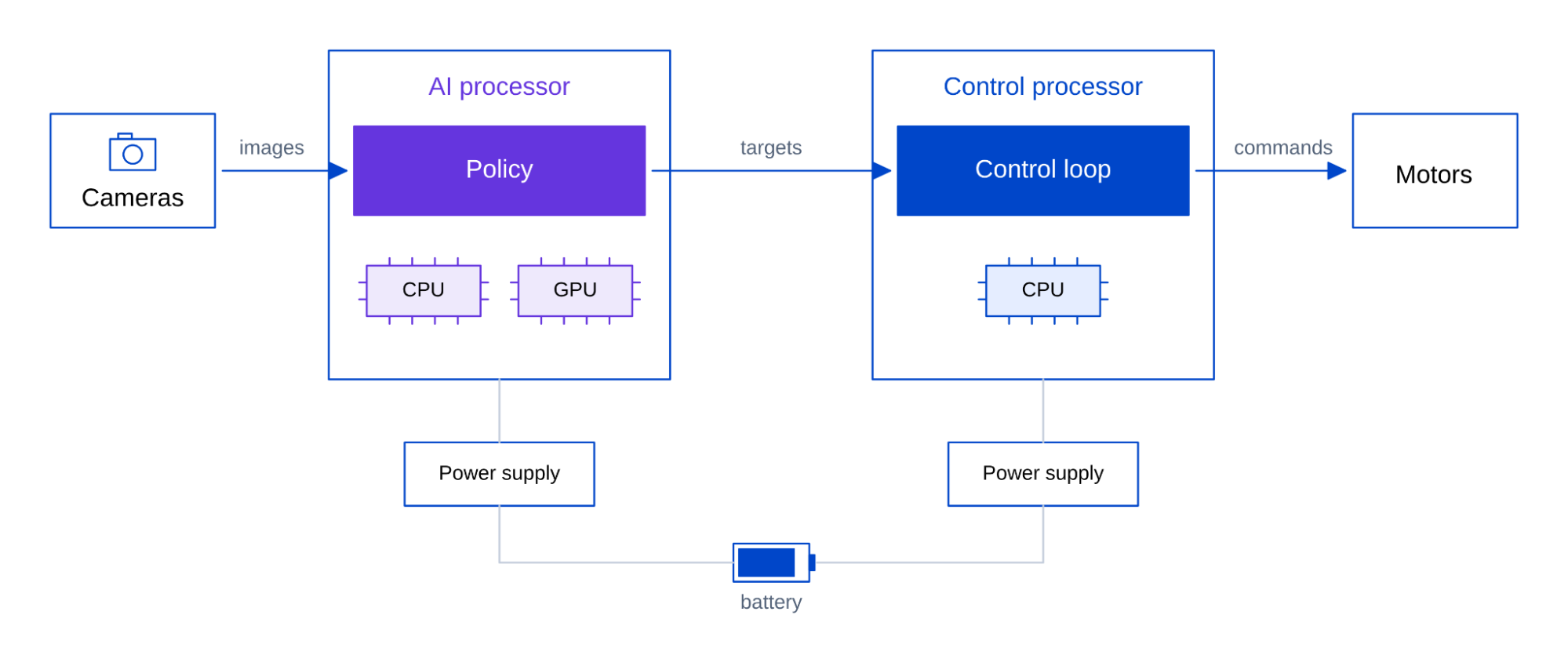
A typical mobile robot carries cameras to see its work, laser scanners to detect obstacles and people, and motors to drive its wheels and arm. A battery powers everything, including the onboard computer. That computer, often built on an Intel processor, runs the real-time motion control that robots have long relied on. We will call it the control side.
The control side holds each joint on target while friction and load push it out of position. Many times a second, it reads where each joint is, compares that with the target position, and corrects the motor command. This repeating correction is the control loop. In a classic industrial arm, the targets come from a fixed program that an engineer sets up once. That works well until the parts, the layout, or the task changes.
Physical AI replaces the fixed program. A learned model now sets the targets, and the control side still carries them out. We will call this new part the AI side. Its core is a policy, an AI model trained on recorded human demonstrations of the task. The policy takes camera images and the robot's state (such as joint angles) and predicts the next movements. Because the policy learns from examples, the robot can handle cases no engineer wrote down, such as a part that arrives at a slightly different angle. That flexibility is what physical AI adds.
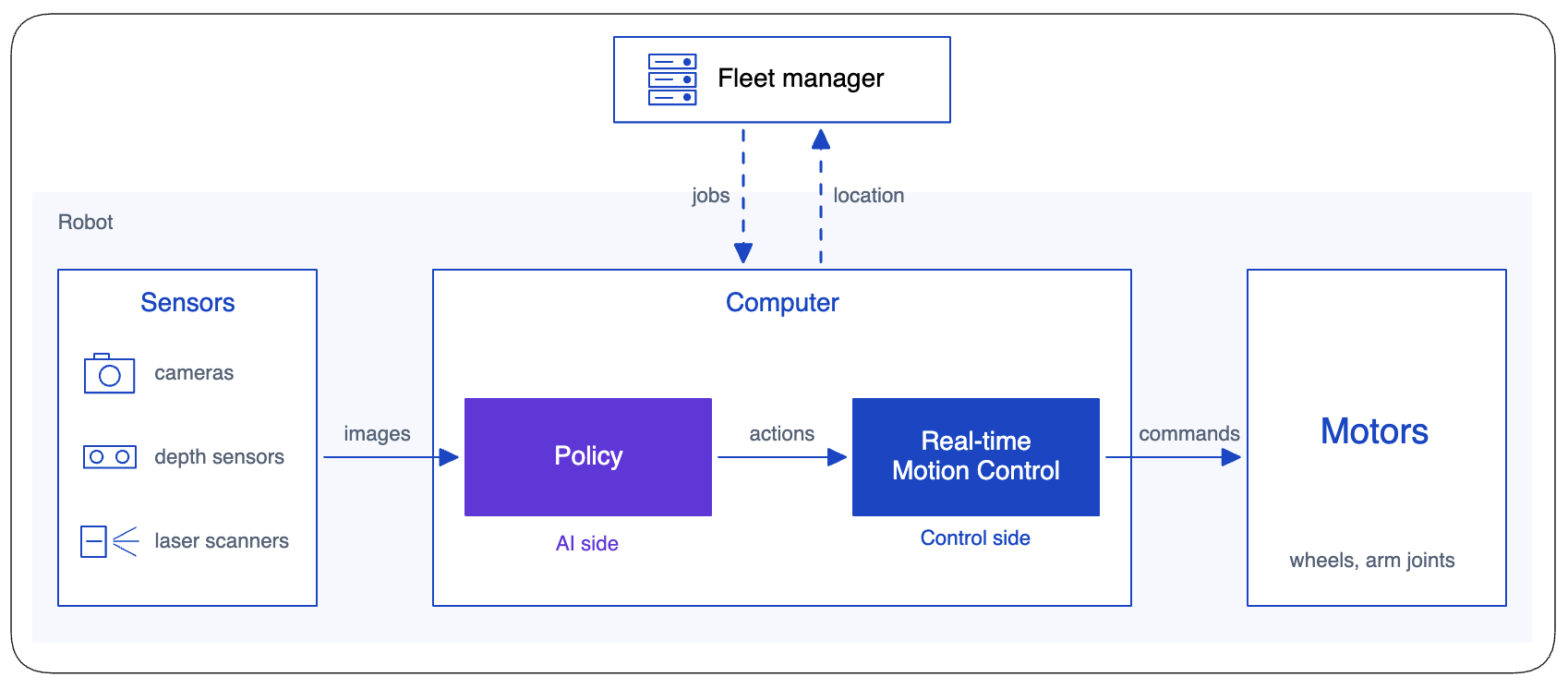
Running the two sides together is hard, because they have opposite requirements. The AI side runs a large AI model for each prediction. As a result, it needs much more compute than the control loop, and its timing varies. The control side is the opposite. It does light work, but it must never be late. A late command is useless, because the arm has already moved on. So the control loop must run in real time. That means every cycle, including the slowest one, must finish by its deadline.
In a short demo, the conflict does not matter much because a rare missed deadline may never happen. The robot can also use a large computer with no limits on power or cost. That is why today’s demo robots get a lot of attention on stage, but many will not survive a production floor.
What Changes in Production
A demo succeeds if the robot completes the task once. It often runs for minutes in an air-conditioned hall, on a smooth floor, with strong Wi-Fi and an engineer nearby. Some stage demos are even teleoperated, with a person controlling the robot remotely. Production asks for much more. The robot has to do the task every shift, at this site, for years. It must also work safely and earn back its cost.
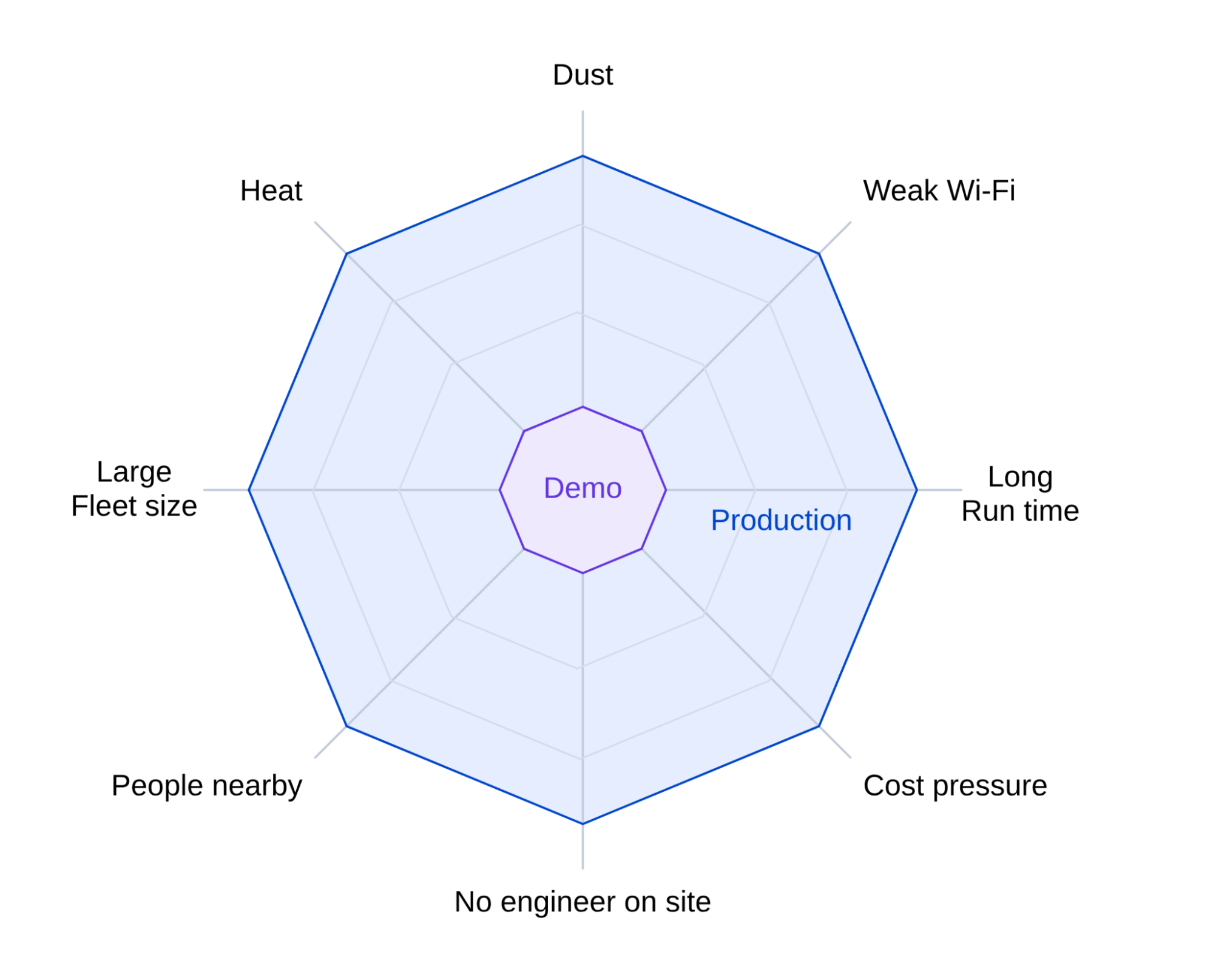
This gap is very important if you want to sell robots to real customers, because customers write their requirements for production. In one example Intel shares, a robot maker's customer required the robot to do five independent tasks for eight hours. It had to do this with no failures and no battery change. The maker's proof of concept was in effect a demo. It could not meet those terms, so the team had to start the design over.
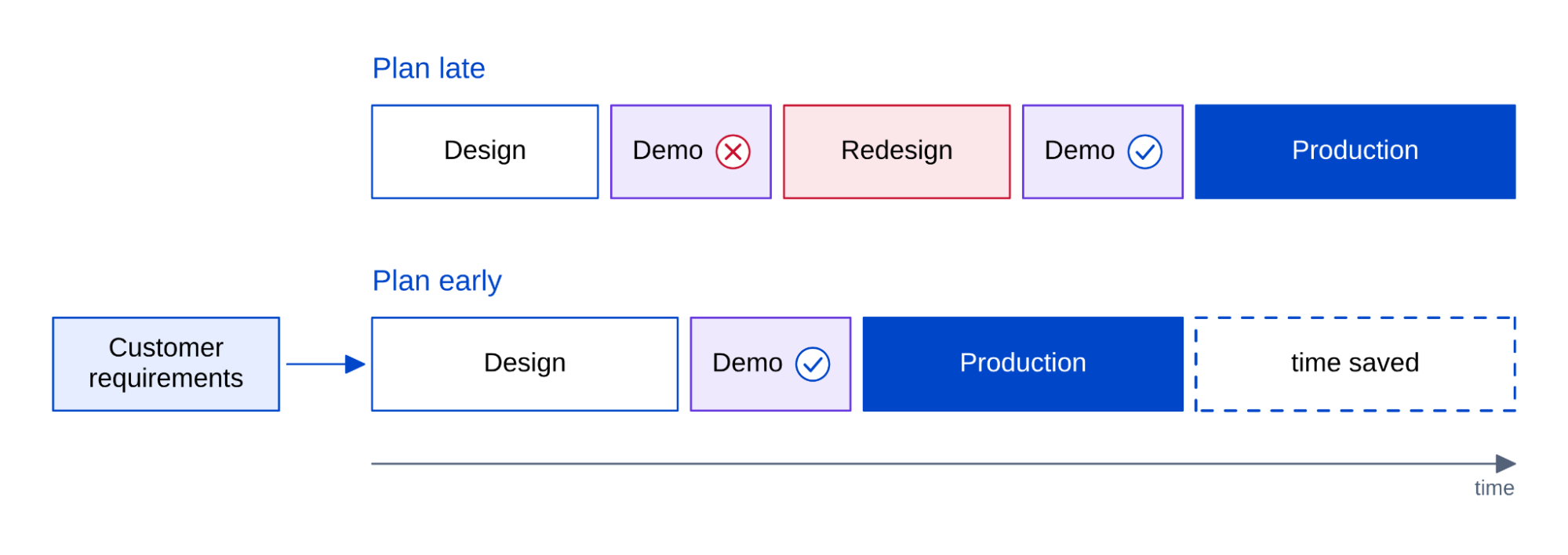
Teams avoid that restart by planning early for such requirements. Three of the most common requirements a production robot is expected to handle are:
- Working a full shift
- Adapting to a new site
- Running a fleet for years
Working a full shift
Production robots must keep working for as long as the line runs. That usually means a full eight-hour shift, while a demo robot may run for 30 minutes. A plant cannot pull robots off an assembly line every 30 minutes to charge them. To work that long, the robot must properly handle energy, heat, time, and cost. With the AI side, this is even more challenging, because the extra compute the model needs draws power, makes heat, takes time, and adds cost.
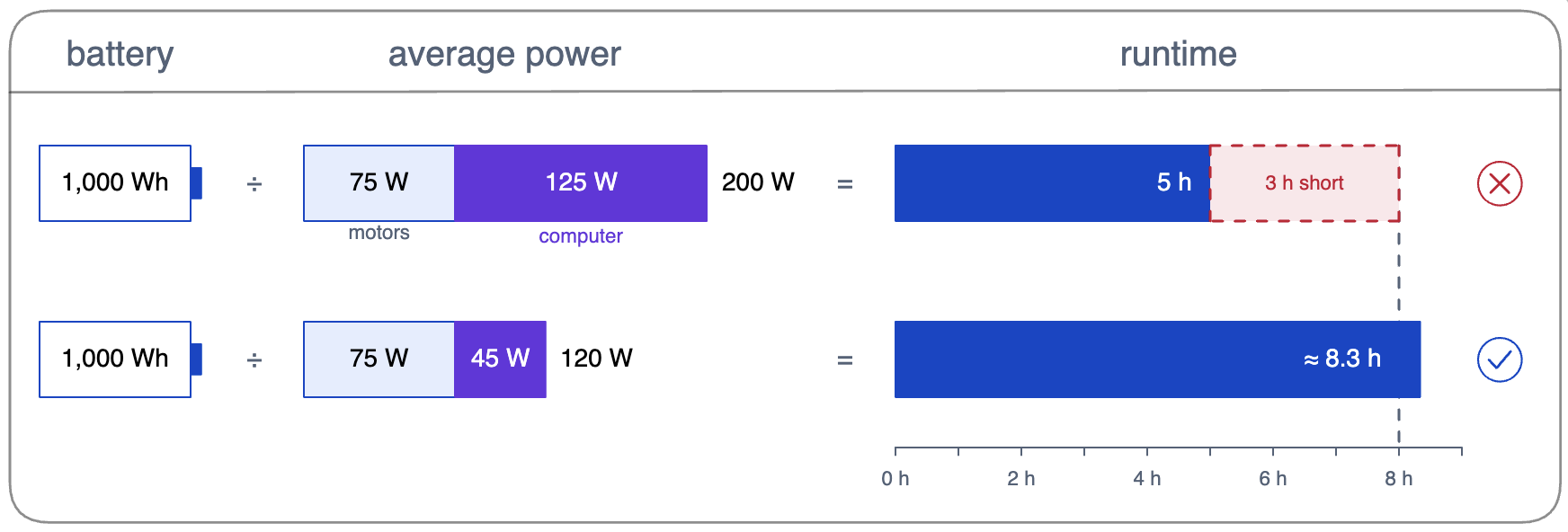
Energy budget. The battery has to last the whole shift. The team often has more control over the computer than over anything else that draws power from the battery. Suppose the robot carries a 1,000-watt-hour battery, and its motors for driving and lifting average 75 watts. With a 125-watt computer, the robot averages 200 watts and runs for five hours. With a 45-watt computer doing the same work, it averages 120 watts and lasts more than eight hours.
Choosing a computer like the 125-watt one is a mistake Intel sees often. Many robotics processors have enough AI compute to run a stage demo but draw more power than a production battery can supply.
To avoid that mistake, teams plan the power budget from the start. One option is to size the computer so the battery can power a full shift of work. A neural processing unit (NPU) helps here. This low-power engine, built for neural network math, can run steady, lighter AI work, such as perception models, on about 2 watts. Some edge processors, including Intel's, put an NPU on the same chip as the CPU and GPU. That way, each AI workload can run on the engine that suits it best.
Another option is to charge so fast that charging fits into the work. For example, one humanoid maker says its next robot is designed to work for 90 minutes and then recharge in nine minutes.
Heat budget. The power the computer draws also becomes heat inside the robot. Yet the computer must keep running at full speed for the whole shift, in a warm, dirty environment. Some robots also work outdoors. Intel cites trials for one large parcel carrier, where robots had to work at 100°F without a single failure.
That heat is a problem because processors built for laptops and offices expect air-conditioned rooms. Near its temperature limit, such a processor lowers its clock speed to make less heat. This is called thermal throttling. An overheating smartphone does the same when it shows a temperature warning. But if your phone asks you to wait, that is probably fine. If a robot slows down in the middle of a pickup, that is not acceptable.
Dust and chemicals make heat harder to remove. A fan pulls dusty air across the electronics, so robots in dirty or corrosive places, such as offshore platforms, need sealed enclosures. With no airflow, the processor runs hotter for the same work.
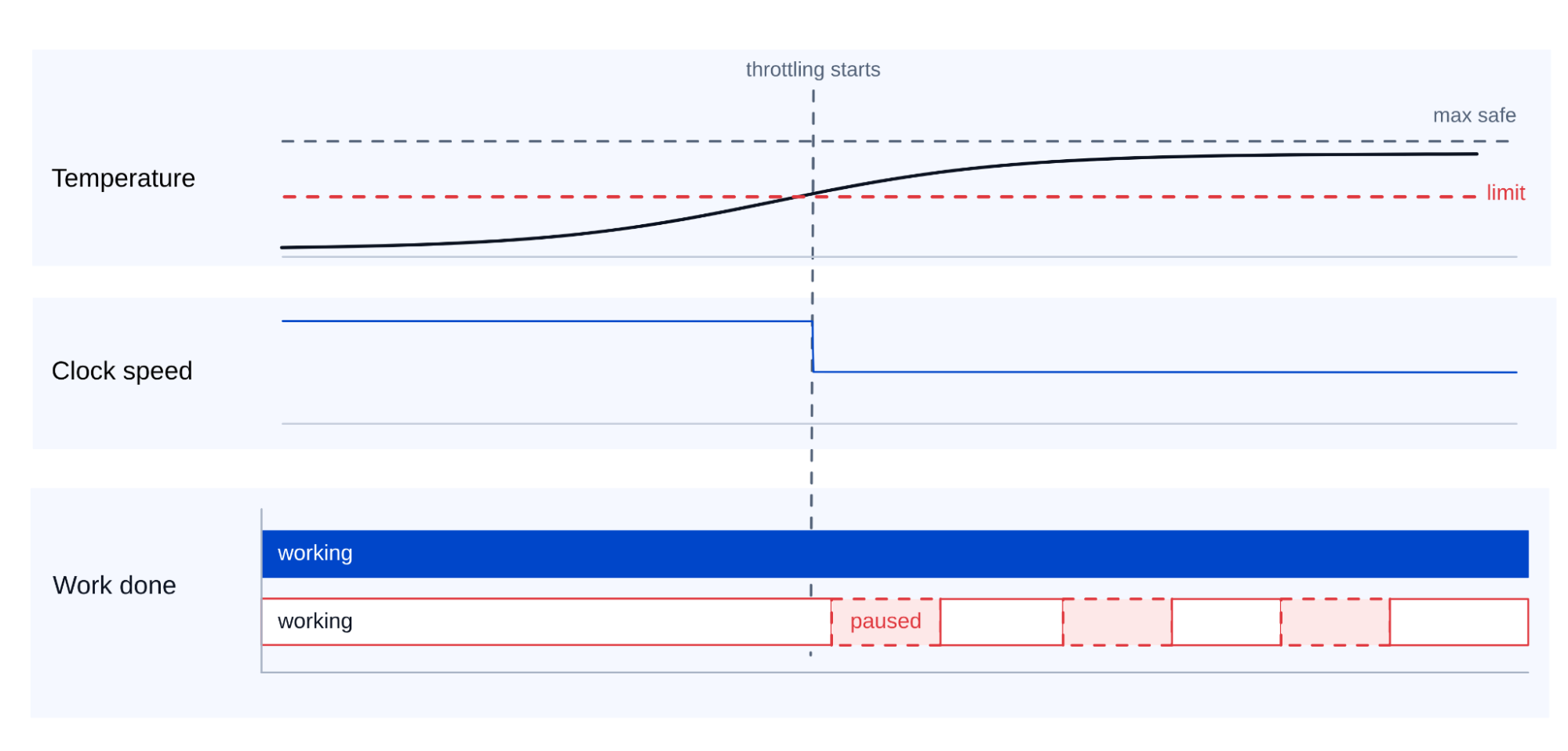
To handle heat, teams use compute rated for the conditions the robot will face. Intel offers select processors rated for extended temperatures and 24x7 operation. These include low-power versions that can run without a fan in a sealed case. Shock ratings matter too. Because the robot moves, the whole computer must survive bumps and docking.
Intel's advice is to check the temperature, duty, and shock ratings of the whole computer against the hottest, dirtiest place the robot will work. Teams that skip this step end up with a robot that works in a keynote hall and fails on the factory floor.
Time budget. The robot must also act on time. In Intel's survey, 78% of leaders say key robotics applications need decisions within 100 milliseconds, and 23% within 10 milliseconds. A production robot has to meet these deadlines every time, so the worst case matters more than the average.
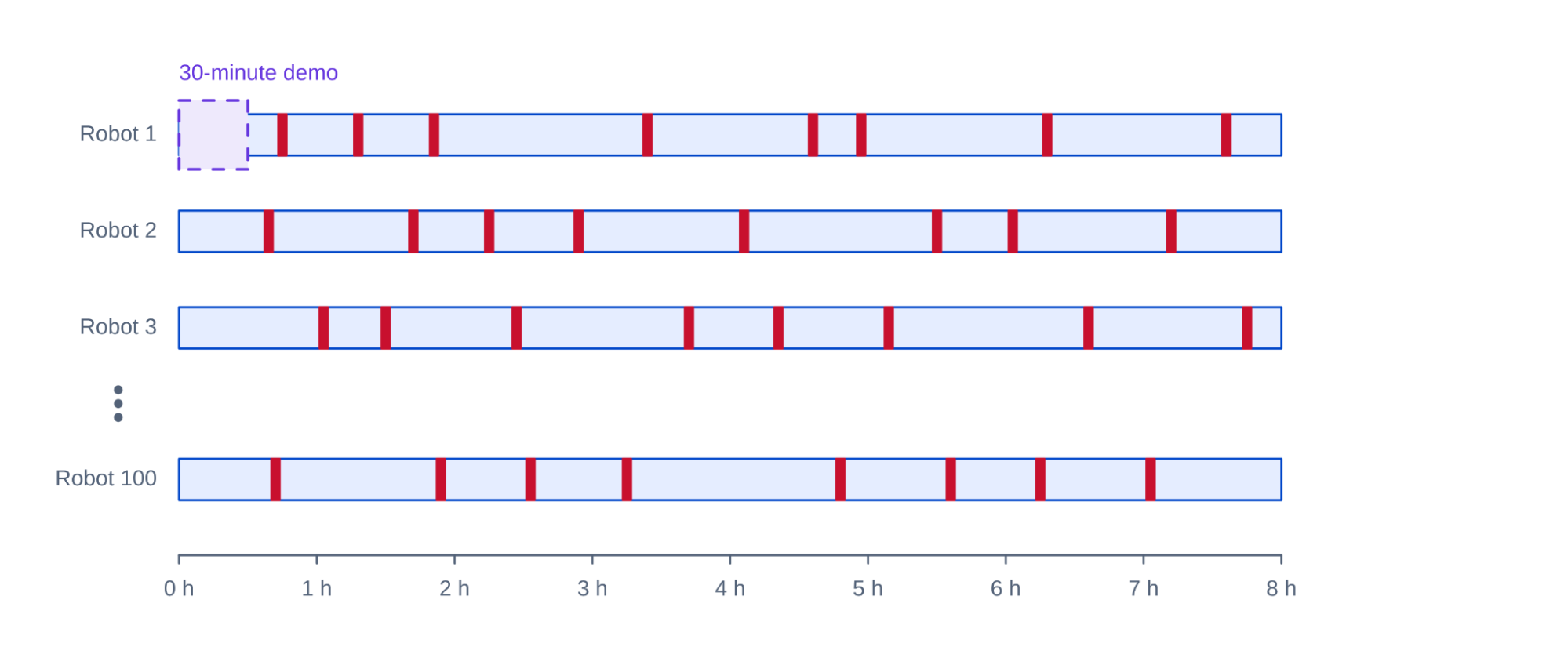
A robot can miss its deadlines for two common reasons. One is a rare stall, a moment when the computer falls behind for a fraction of a second. A stall that happens once an hour may not appear in a 30-minute demo. Across 100 robots on an eight-hour shift, it happens 800 times.
The other is the pause while the runtime waits for the next prediction. The runtime is the software that schedules predictions and sends actions to the robot. If it asks for a new prediction only after the arm finishes its last movements, the arm stops and waits each time. A common fix is to have the runtime start the next prediction while the arm is still moving. For both problems, measure the worst case over long runs, not the average over a short demo.
Cost budget. A robot is worth buying only if it saves more in labor and time than it costs. Much of the computing cost depends on how many processors the robot carries. Deciding how many processors to use is hard because of the two sides described earlier. The policy on the AI side and the control loop on the control side need opposite things from a processor.
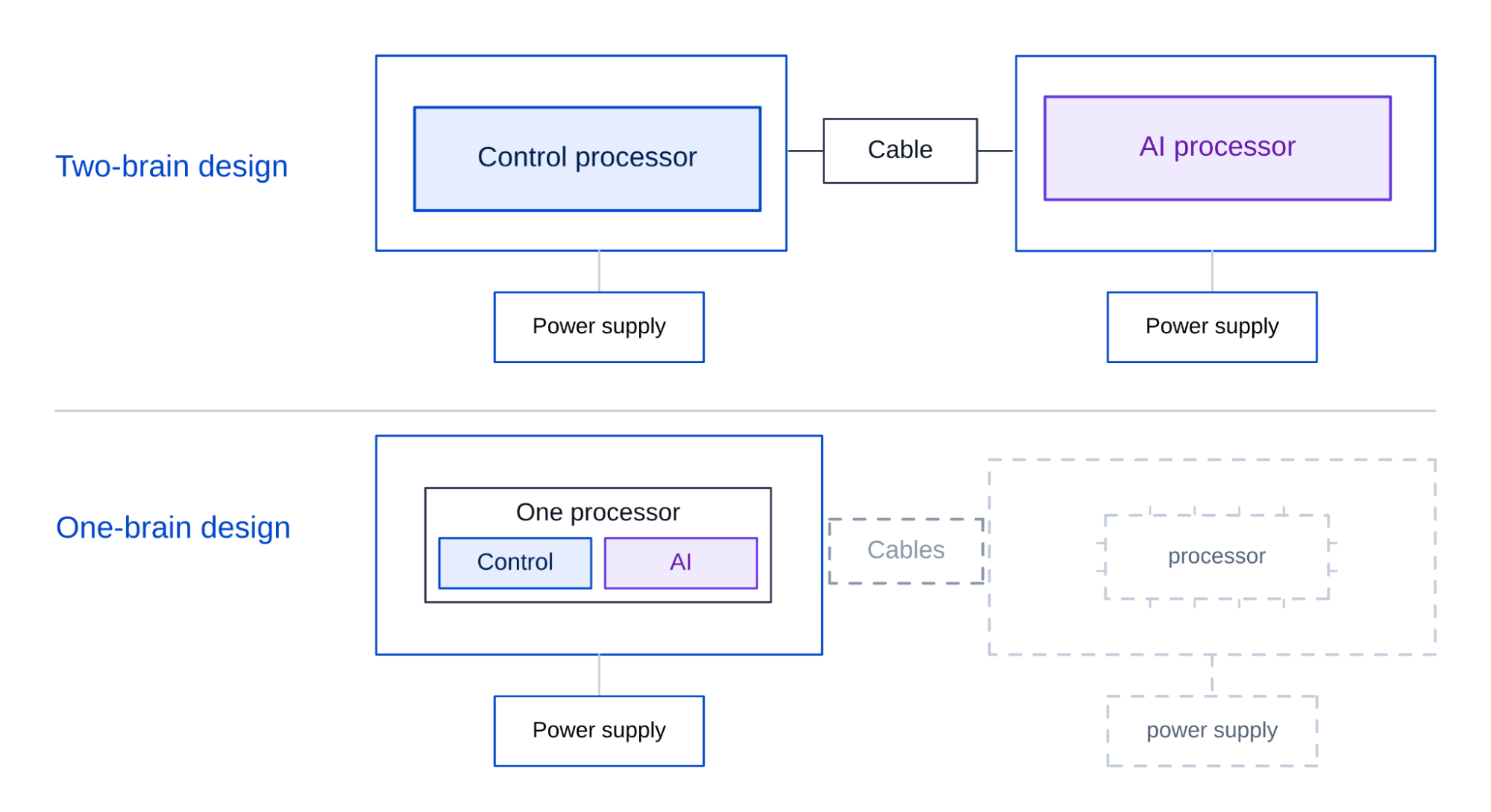
A common way to run both is to give each side a processor designed for that job. A control processor runs the motors. An AI processor, often paired with a GPU, runs the policy. This is called the two-brain design. Two brains keep timing manageable. The control loop never competes with the AI for processor time, and the GPU is good at making fast predictions.
The downside is higher hardware cost. Two brains put an extra processor, board, cables, and power supply on each robot. Intel estimates that one processor running both control and AI can save as much as $5,000 or more per robot. Sharing a processor brings its own risk, though. A burst of AI work can take over the cores, cache, and memory that the control loop needs. The loop can then miss its deadline. As Matthew Formica, head of edge product marketing at Intel, puts it, "Control has to keep running, no matter what else is happening."
To get the savings without that risk, teams use a one-brain design that protects the control loop with partitioning. Partitioning gives each workload a fixed share of cores, cache, and memory, often in separate virtual machines. Because the control loop keeps its own cores and its own share of the cache, a burst of AI work cannot take them away. Some processors have built-in support for this. Many of Intel's edge processors, for example, include Time Coordinated Computing (TCC). TCC is a set of features and tools that can reserve cache for real-time work and shield it from other workloads.
The approach has a long track record. In 2010, KUKA's KR C4 robot controller already ran its real-time control loop and its user interface on one Intel processor. The control loop ran up to 8,000 times per second, and real-time virtualization kept the two apart. Today, Intel's Robotics AI Suite includes a reference design that goes further. It runs three workloads in separate virtual machines on one Core Ultra processor: ROS 2 (a common robot software framework), real-time safety loops, and an AI policy.
Deciding between one-brain and two-brain designs depends on how strict the real-time requirements are, what two brains cost in time, parts, and complexity, and whether customers require a dedicated control processor. Two brains can still win, for example when the control processor is already safety-certified on its own.
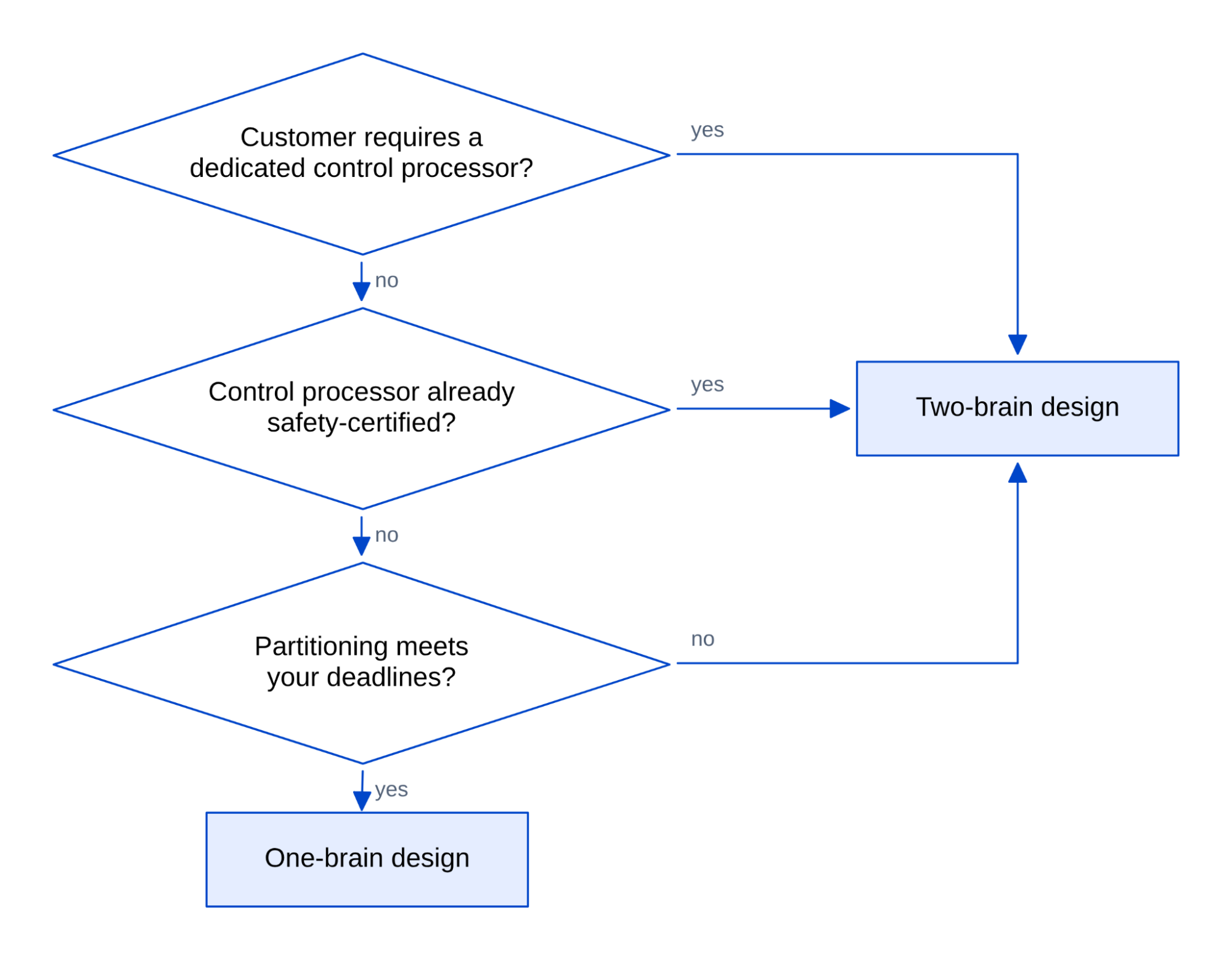
Together, these fixes turn the demo robot into one that works a full shift. Its computer is sized to last the shift on one battery. It is rated for heat, dust, and shock, and often sealed without a fan. Its control loop keeps a protected share of the processor if it shares a chip with the AI. Its runtime plans the next movements while the arm is still moving. Before committing to a design, make sure your team (or the vendor) tests it under shift conditions.
Adapting to a new site
A robot that works a full shift at one site will often be needed at another. Moving it involves two jobs. The team must re-teach the policy for a new scene and re-prove safety around new people.
A new site changes what the policy sees. A policy handles the variation it saw in its training demonstrations. A new site brings variation the policy never saw, such as glare, a different background, or parts in unfamiliar positions. For example, a policy that completes 18 of 20 picks at the first site might complete only 11 of 20 at the second.
To adapt the policy, teams fine-tune it at each new site. A person teleoperates the robot through the task to record demonstrations. The team trains the policy on these demonstrations and then tests it on the robot under real conditions. Open-source tools now cover this whole loop. Intel's Robotics AI Suite, for example, includes Physical AI Studio, which records demonstrations, trains the policy, and runs it on the robot.
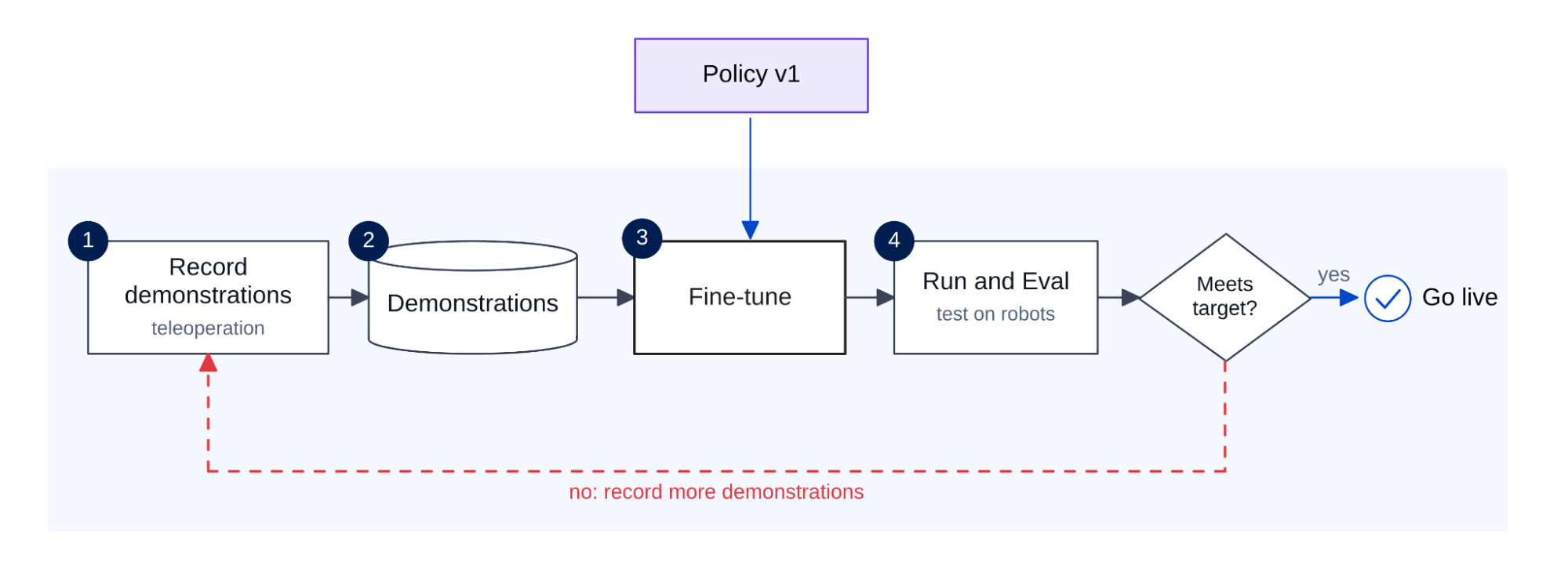
A new site also has its own safety rules. Retraining changes how the robot behaves. So if safety is part of the policy, each retrain would mean proving safety again from the start. Intel recommends keeping safety out of the policy. The policy only proposes actions. A separate safety system, built from safety-rated scanners and a certified safety controller, can stop the robot when needed. This way, a retrained policy changes how well the robot works at the new site, without affecting the safety system.
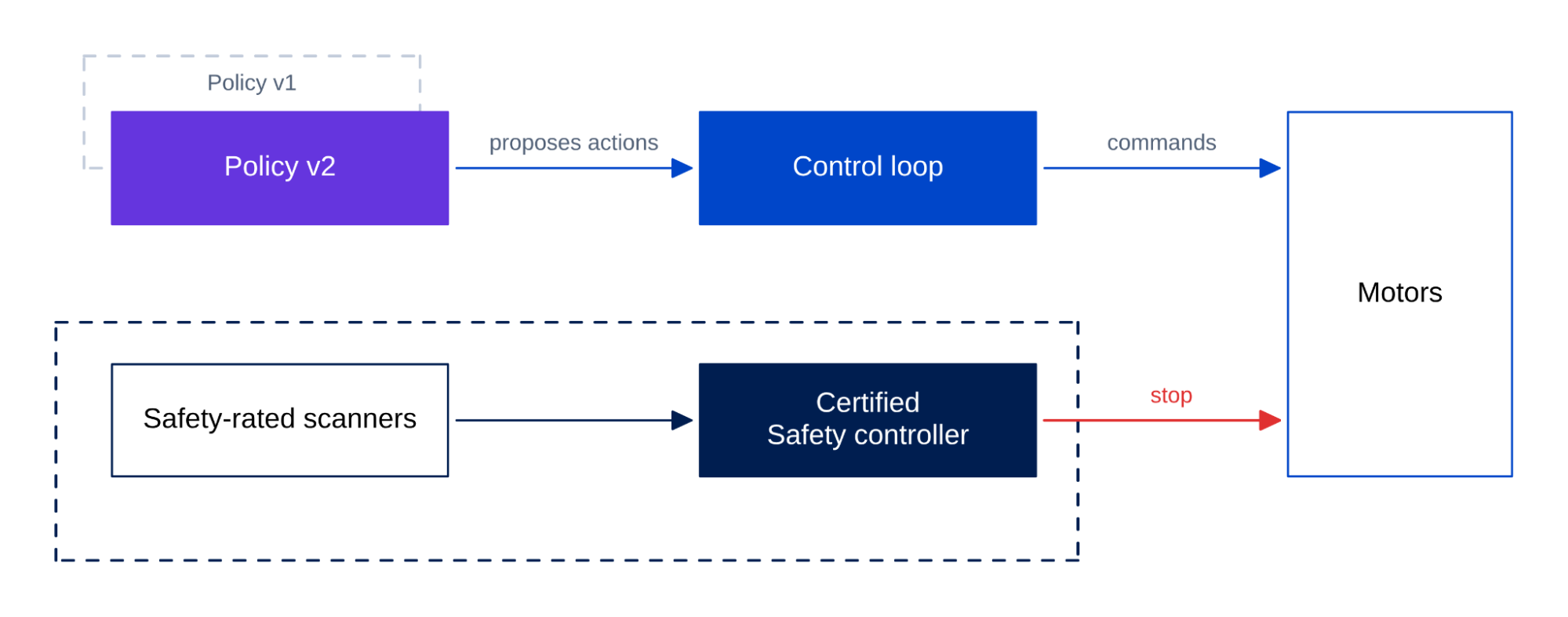
Your robot is ready for a second site only when your team knows how to retrain the policy and how to re-prove safety there.
Running a fleet for years
Once your team can adapt a robot to new sites, the next step is to run many of them. In production, that is where the value comes from. A fleet is dozens or hundreds of robots, managed together for years by a fleet manager. This is software that talks to each robot over the wireless network, assigns its tasks, and tracks where it is. Teams must know how to get a spare part for an eight-year-old robot, update 100 robots without stopping the line, and keep each robot connected as it moves. Let's look at the common challenges of running a fleet for years.
Supply and repair. The robots must keep running and stay fixable for years after they ship. Intel estimates that a mobile robot works for 5 to 10 years before a major refresh. Design can take years too. Suppose your robot takes three years to design and then works for eight. Its processor, operating system, and security fixes must still be available 11 years after design starts.
Repairs get costly too. When a part fails, the robot often has to go back to the vendor. Imagine a fleet of 100 robots where each robot fails once a year and each repair takes two weeks. That adds up to 200 robot-weeks of downtime a year. It is like having about four robots out of service all year.
Keeping spare boards on site cuts that downtime, but only if you can still buy the same board when you need it. That makes the processor a good place to start. Intel’s embedded and industrial processors come with long-life availability. This lets board makers keep the same board on the market for many years.
Updates and security. The fleet must take new software for years without failing or being attacked. A fleet will take new policies, bug fixes, and security patches for years. If any of these updates fails or has safety risks, it slows down everything.
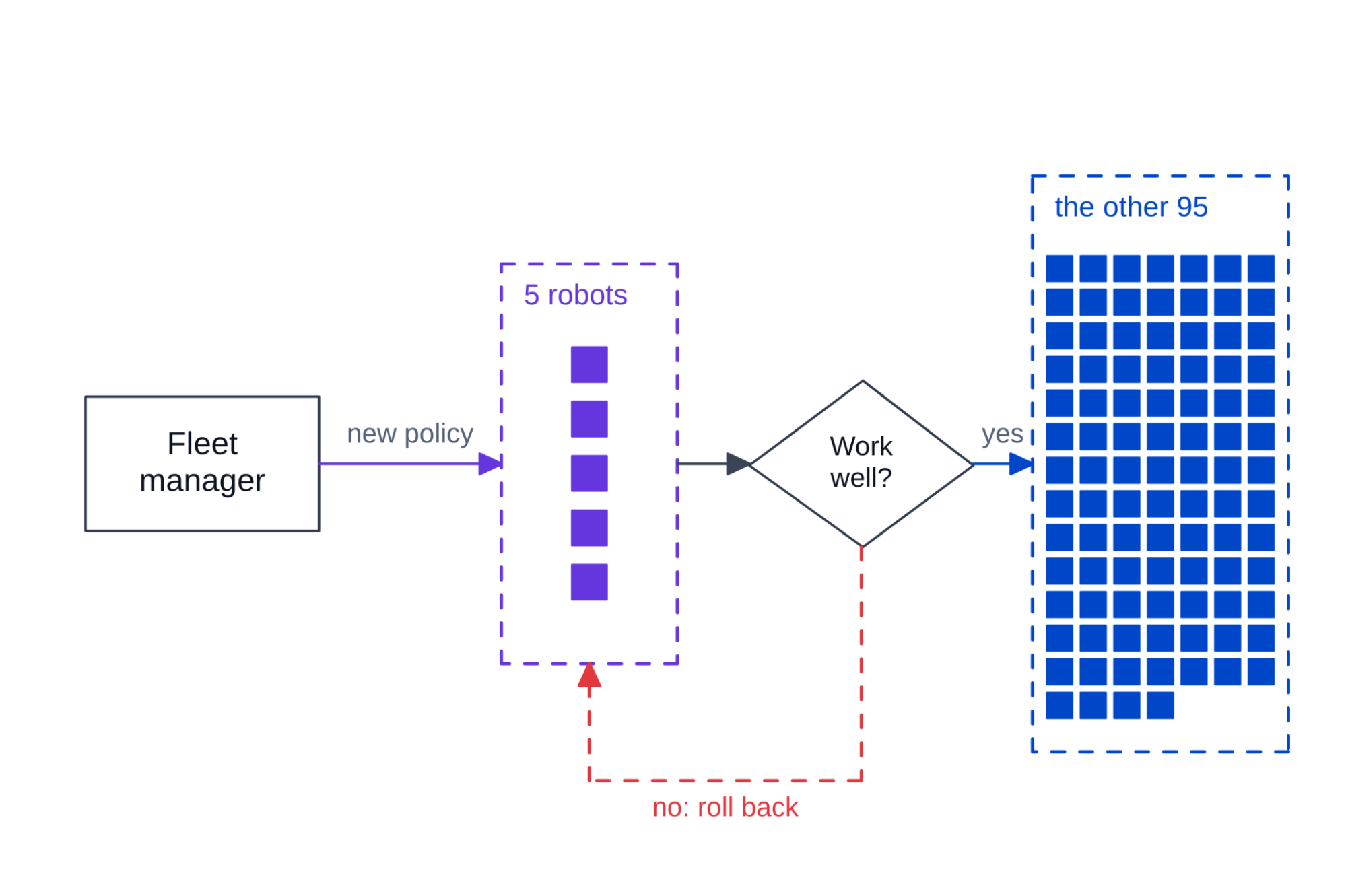
To update safely, a robot keeps two copies of its software, in slots A and B. It runs from A while the update installs into B, then switches to B between shifts. If B fails its checks, the robot falls back to A automatically. Many smartphones update the same way. Teams also roll out updates gradually. A new policy first goes to five robots and reaches the rest of the fleet only if those five work well.
Updates are also a common path for attackers, so security starts in the hardware. With secure boot, the robot checks that its firmware and operating system are signed and unchanged before running them. This stops tampered software from booting. Each robot keeps a private key locked in dedicated security hardware, such as a trusted platform module (TPM). The key lets the robot prove to the fleet manager that it is the real robot.
Teams also keep the AI, the safety functions, and the fleet software in separate partitions. This limits how far an attacker can spread after getting into one part. Intel processors, for example, have built-in hardware support for all three protections. So ask the vendor whether these protections are turned on and used.
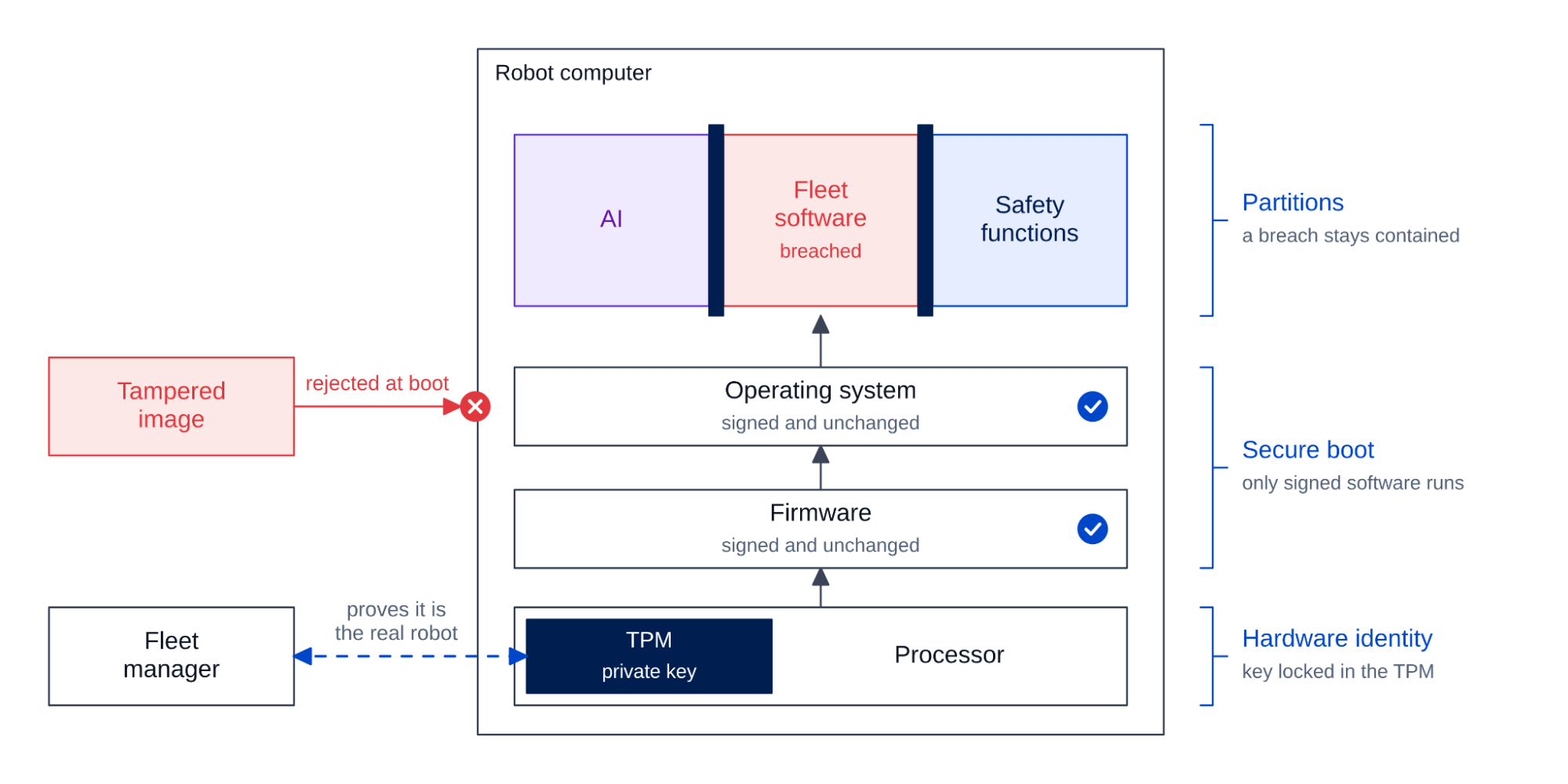
Connectivity. Lastly, each robot must stay connected to the fleet manager as it moves. A connection can fail in two ways. The link may drop in an area with weak coverage, which cuts the fleet manager off from the robot. Or the link may stall while the robot moves from one wireless access point to the next. In Intel’s experience, slow handoffs are a common problem for moving robots.
To avoid both problems, teams plan the network for the robot's whole route. They check coverage along each path the robot drives. They choose a network that hands off quickly and reliably. Intel recommends Wi-Fi 7 with fast roaming turned on, or private 5G, a cellular network that a company runs on its own site. They also make sure the robot can keep working for a short time without the link, so a brief drop does not stop it.
Shortening the Road Ahead
A robot that survives a full shift, a new site, and years in a fleet is ready for production. The next robot gets there faster if the team solves each of these problems only once. Many of the problems in this article do not depend on the robot's specific task. For example, energy efficiency, temperature ratings, a protected control loop, secure boot, and safe updates are the same regardless of the task.
Today's robot platforms are built on this idea. They give each new robot a base that already handles many of these problems. Intel's platform is one example. Its Core Ultra Series 3 edge processors put a CPU, GPU, and NPU on one chip. Select Series 3 edge processors also support extended temperature ranges and industrial operating conditions, including 24x7 operation. On top of them, Intel's open-source Robotics AI Suite adds reference designs and tools, such as the one-processor design and Physical AI Studio described earlier.
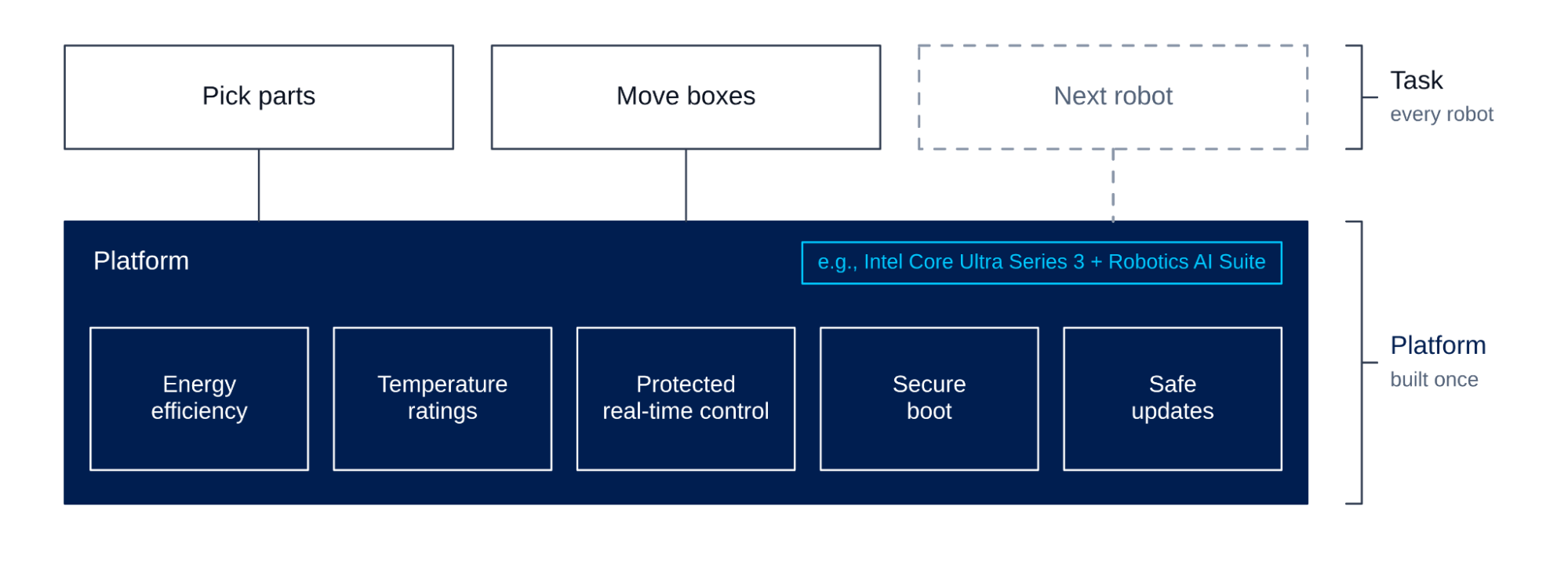
The table sums up what to check for each requirement in this article, and where Intel's platform fits.
| Requirement | What to check | Where Intel fits |
|---|---|---|
| A full shift on one battery | The computer's power draw, and an NPU for steady AI work | Core Ultra Series 3 puts a CPU, GPU, and NPU on one chip |
| Heat, dust, and shock | Temperature, 24x7, and shock ratings for the whole computer | Select Series 3 edge processors support extended temperatures and 24x7 operation |
| Real-time control next to AI | Partitioning, and worst-case timing over long runs | Time Coordinated Computing (TCC) and the Robotics AI Suite one-processor reference design |
| A new site | Tools to record demonstrations and fine-tune the policy | Physical AI Studio in the Robotics AI Suite |
| Safety | Safety kept outside the policy, with a certified safety controller | Functional safety support on select Intel processors |
| Security | Secure boot, a TPM, and separate partitions | Built-in hardware support on Intel processors |
| Spares for years | Long-life availability for the processor and board | Intel embedded and industrial processors with long-life availability |
Physical AI makes robots much more capable, and it also makes production harder. The robot now runs a heavy AI workload beside the control loop it already had. Teams whose robots work every shift begin planning for both at the first demo. Whichever platform you choose, ask the vendor to show it running a full shift.
To see how Intel approaches these problems, learn more here.