Optimizing AI Agents for Production on Microsoft Azure
· Ali Aminian, Staff ML Engineer at Adobe
Sponsored
Building a demo agent is simple. You wrap a large language model (LLM) in a loop and give it a few important tools. The LLM plus the simple system you build around it (called the harness) becomes your demo agent. Then you test it to ensure it is working.
Let's assume you want to build an agent that helps on-call engineers investigate alerts. You can create four tools for logs, metrics, deploys, and the incident channel. To show it works, you run it on a real alert. When errors spike, it can quickly investigate the issue and report back.
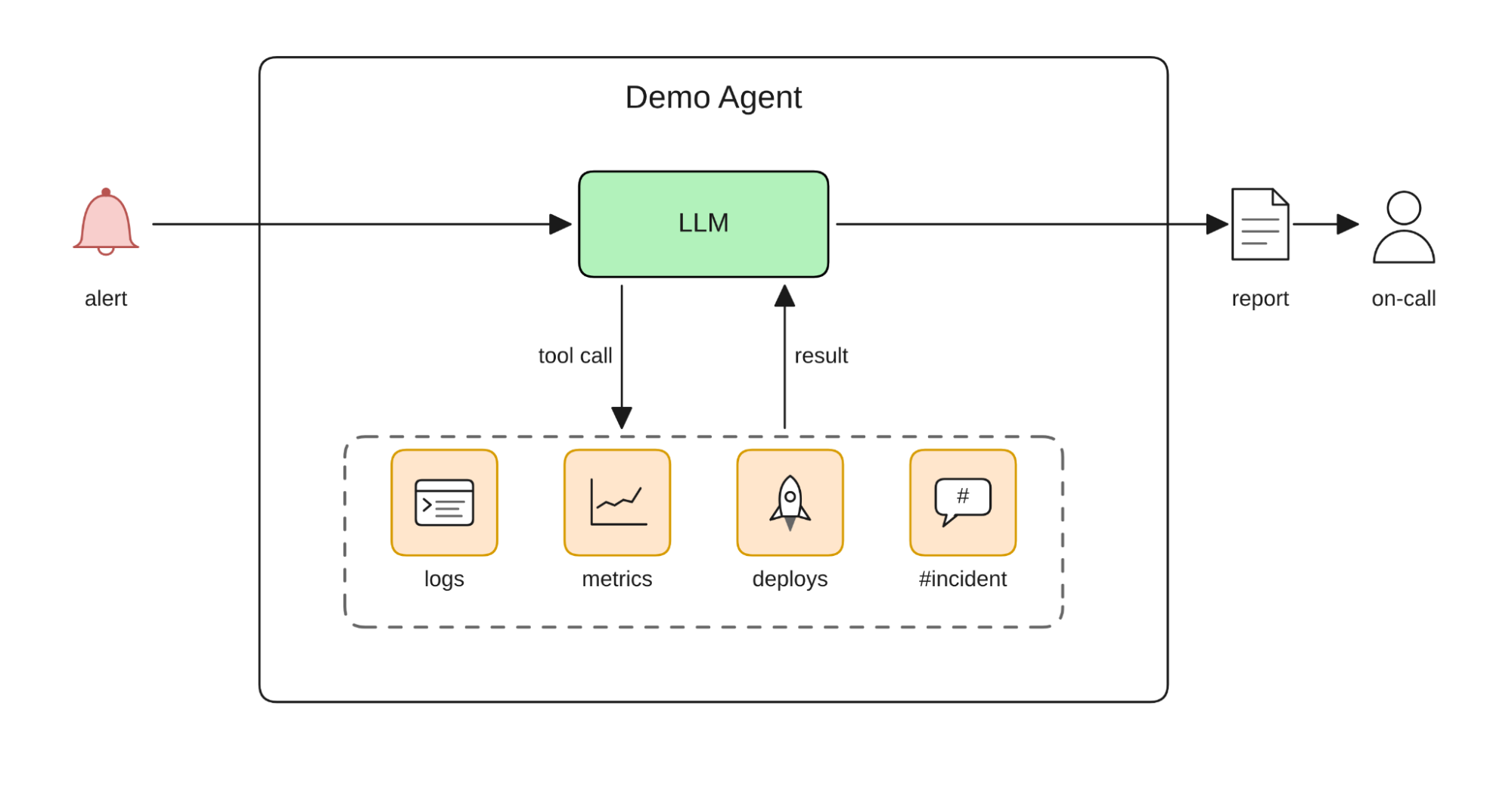
A demo agent is an LLM, a loop, and a handful of tools.
But a simple setup like this only works in demos. If you deploy this agent and run it for a whole team, it will break. The tool set will slowly grow from four tools to more than a hundred, because the agent has to reach the systems the engineers use. Investigations can run for many steps, so the LLM may soon run out of context.
Production agents include various components in the harness, each designed carefully to handle edge cases and known limitations of LLM agents. For example, the harness needs a dedicated component to handle tools, and a context management component to ensure the agent won’t run out of context. It also needs a memory component to remember useful information from past sessions.
To show how a production agent handles these limitations, this article focuses on four of its key components:
- Tools
- Context Management
- Memory
- Knowledge Retrieval
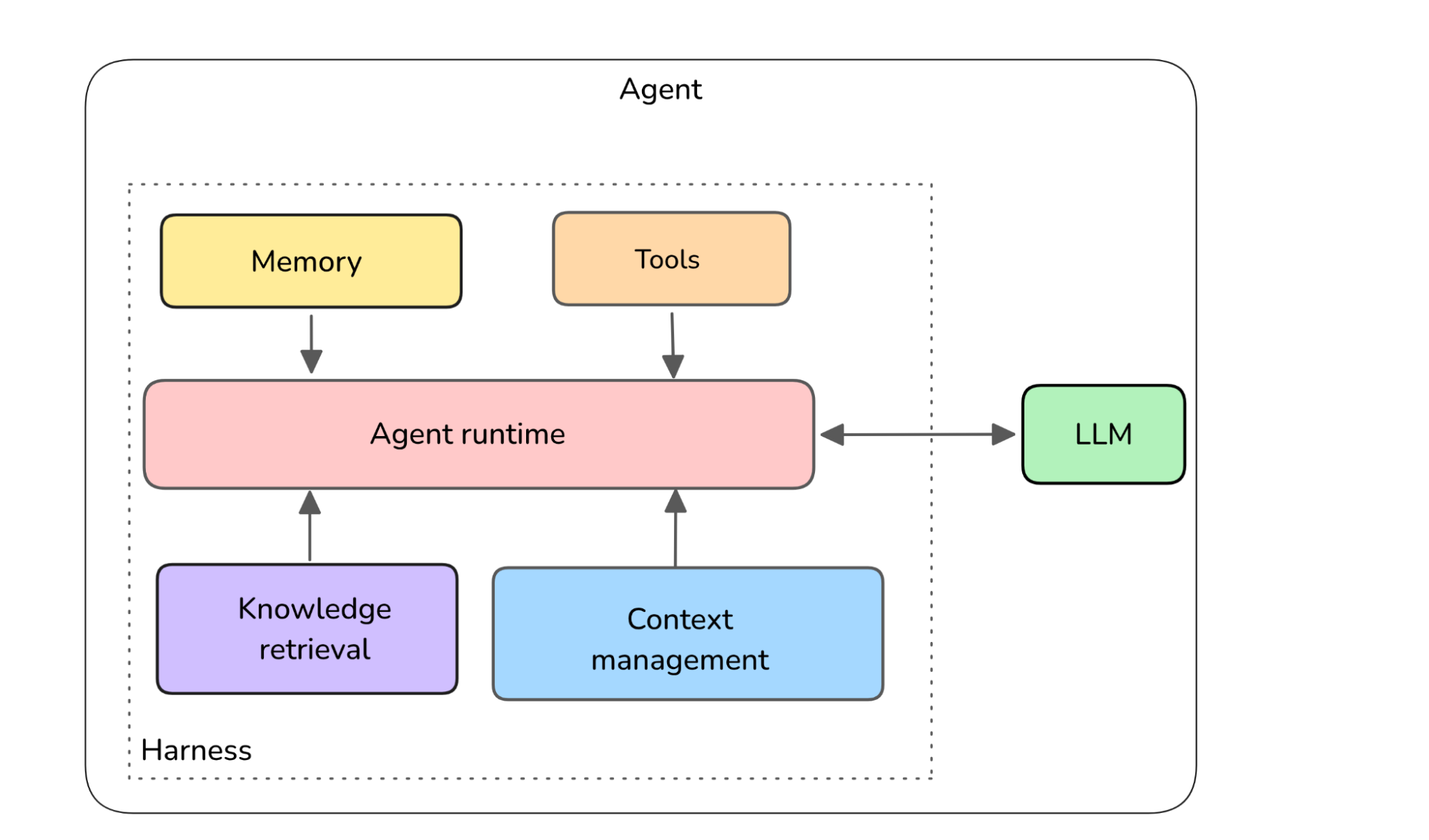
A production agent is an LLM plus a harness.
Each section starts with where the demo breaks, covers the techniques that fix it, and ends with the managed version on Microsoft Azure. Most of these techniques work for any agent, whatever domain or framework you use. They make the agent cheaper, faster, and more accurate by keeping the context focused on what the model needs at each step.
Tools
A tool is a function the agent can call. It can be a Python script you write or an external API. The LLM can't run these tools itself, or see their code. Instead, the harness puts a definition of each tool in the context. A definition typically has the tool's name, a short description, and a JSON schema for its parameters. Here is what the definition of query_logs might look like:
{
  "name": "query_logs",
  "description": "Searches the logs within a time range.",
  "parameters": {
    "type": "object",
    "properties": {
      "service": { "type": "string" },
      "query": { "type": "string" },
      "start_time": { "type": "string" },
      "end_time": { "type": "string" }
    },
    "required": ["service", "query"]
  }
}
With these definitions in the context, the LLM knows which tools exist. When it needs one, it outputs a tool call with the tool’s name and arguments. The harness then executes the tool, adds the result to the context, and sends the updated context back to the LLM.
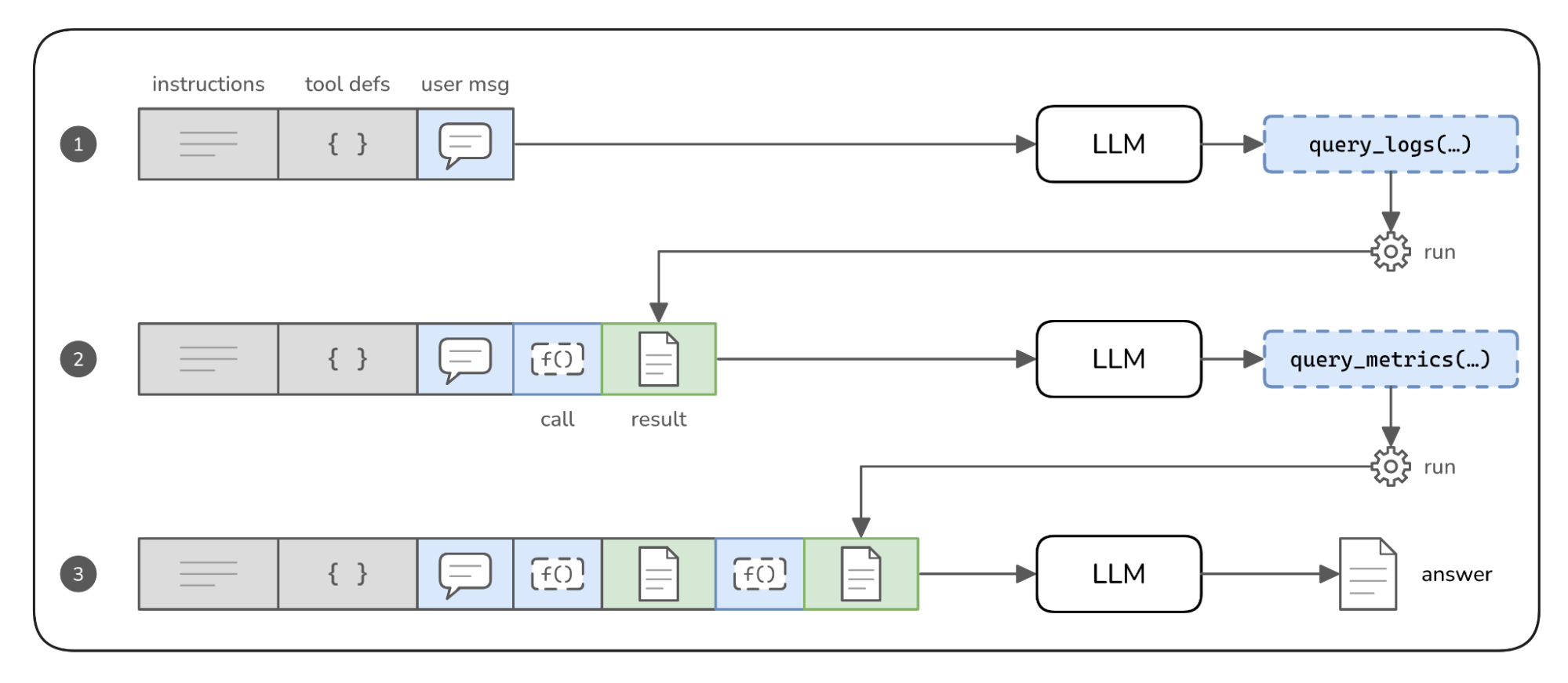
Every tool call and its result are added to the context
What has been described so far is how most demo agents handle tools these days. In a demo, there are only a few tools. The on-call agent in our demo has only four tools. Together, their definitions take up a few thousand tokens at most. That is negligible compared to a frontier model's context window, which is often a million tokens or more. Choosing the right tool is also easy, because the model only has four tools with clear descriptions to choose from.
In production, things are different. An agent might have hundreds or even thousands of tools. The list also grows as more teams use the agent and add their own tools as needed. Anthropic gives the example of a much smaller setup, five Model Context Protocol (MCP) servers with 58 tools, where the definitions alone take about 55,000 tokens. These definitions are included in the context of the LLM for each call, whether the agent uses them or not [1].
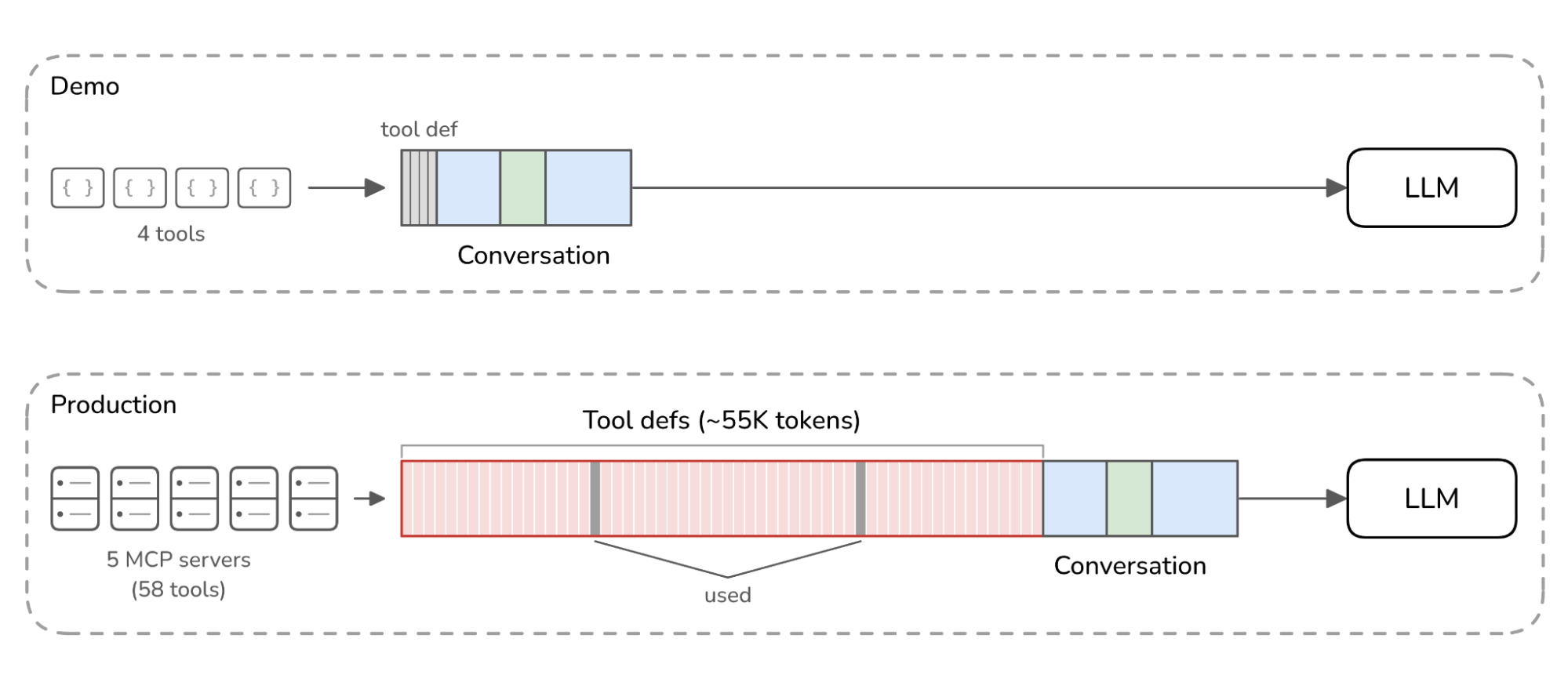
Demo vs production tool definitions
There is a second problem in production agents. Since there are more tools, it is more likely that some of them look alike or conflict (more examples). For example, if one server offers search_logs and another offers query_logs, the model has to guess which one to use each time searching logs is needed. This is a major issue, since LLMs often pick the wrong tool when tool names are similar or their functions overlap.
When building a production-ready agent, teams handle these issues with two techniques:
- Curated tool registry
- Dynamic tool loading
Curated tool registry
To avoid an agent with hundreds of overlapping or conflicting tools, teams keep a curated tool registry. You can think of it as a single, governed list of the tools where each entry has an owner, a version, and a clear description written for the model.
Once the tools live in a single place, you can curate them by hand to keep them effective for the production agent. Most of the curation is removing things. For example, if both search_logs and query_logs return the same data, you keep one in the registry. If one tool is not needed for the task the agent is handling, you remove it. You can also require a clear description for each tool and rewrite it to say what the tool does, when to use it, and when not to. For example, "gets logs" might become "searches the logs of one service within a time range. Use it to find error messages, not to check metrics."
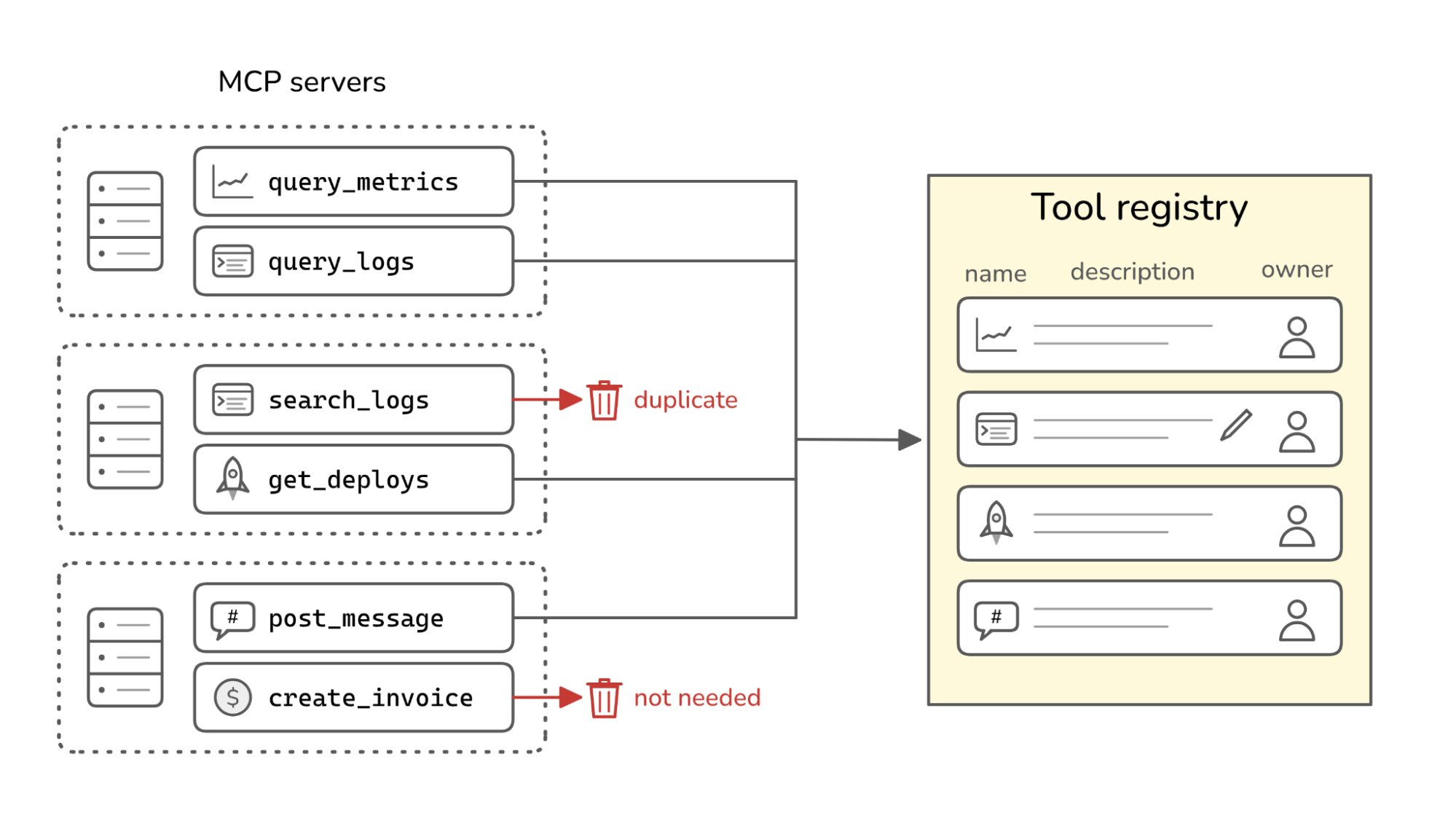
A curated tool registry
With this registry in place, the agent can connect to it and see only the approved tools. This curated tool registry helps to maintain a smaller set of tools with clear descriptions, and so the LLM can be more effective. But this only fixes one of the issues described earlier. The harness still has to put all tool definitions available in the registry in the context of the model, which can take hundreds of thousands of tokens. To fix that, teams use dynamic tool loading.
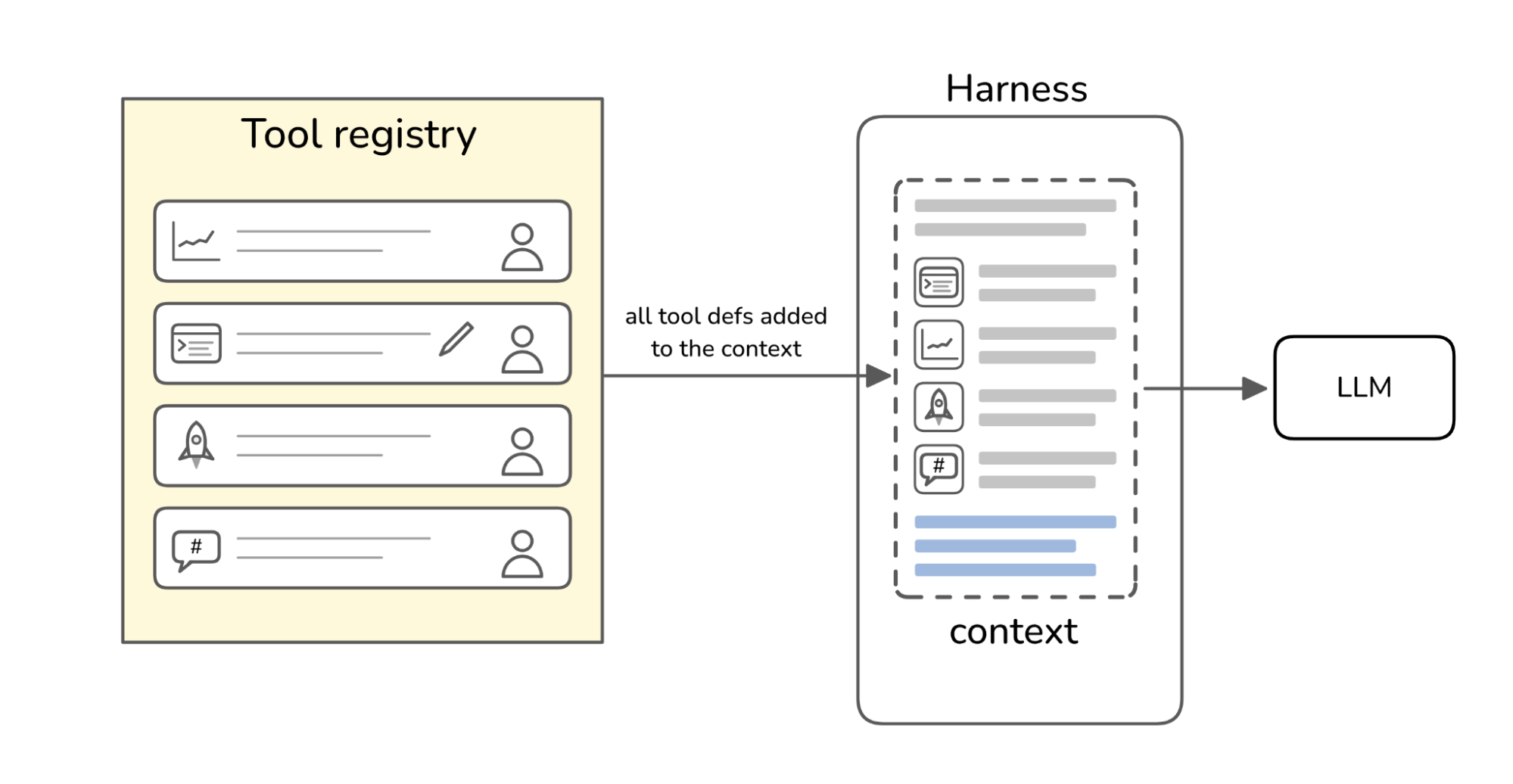
Every registered definition is still loaded on each call.
Dynamic tool loading
The idea behind dynamic tool loading is to add a tool's definition only when a task needs that tool, instead of loading all of them at the start. A common way to do this is to create a new tool named tool_search. The full definitions are not loaded at the start and stay outside the context. Only tool_search is loaded. When the model wants a tool, it uses the tool_search to obtain its full definition. You can see the workflow in the following figure.
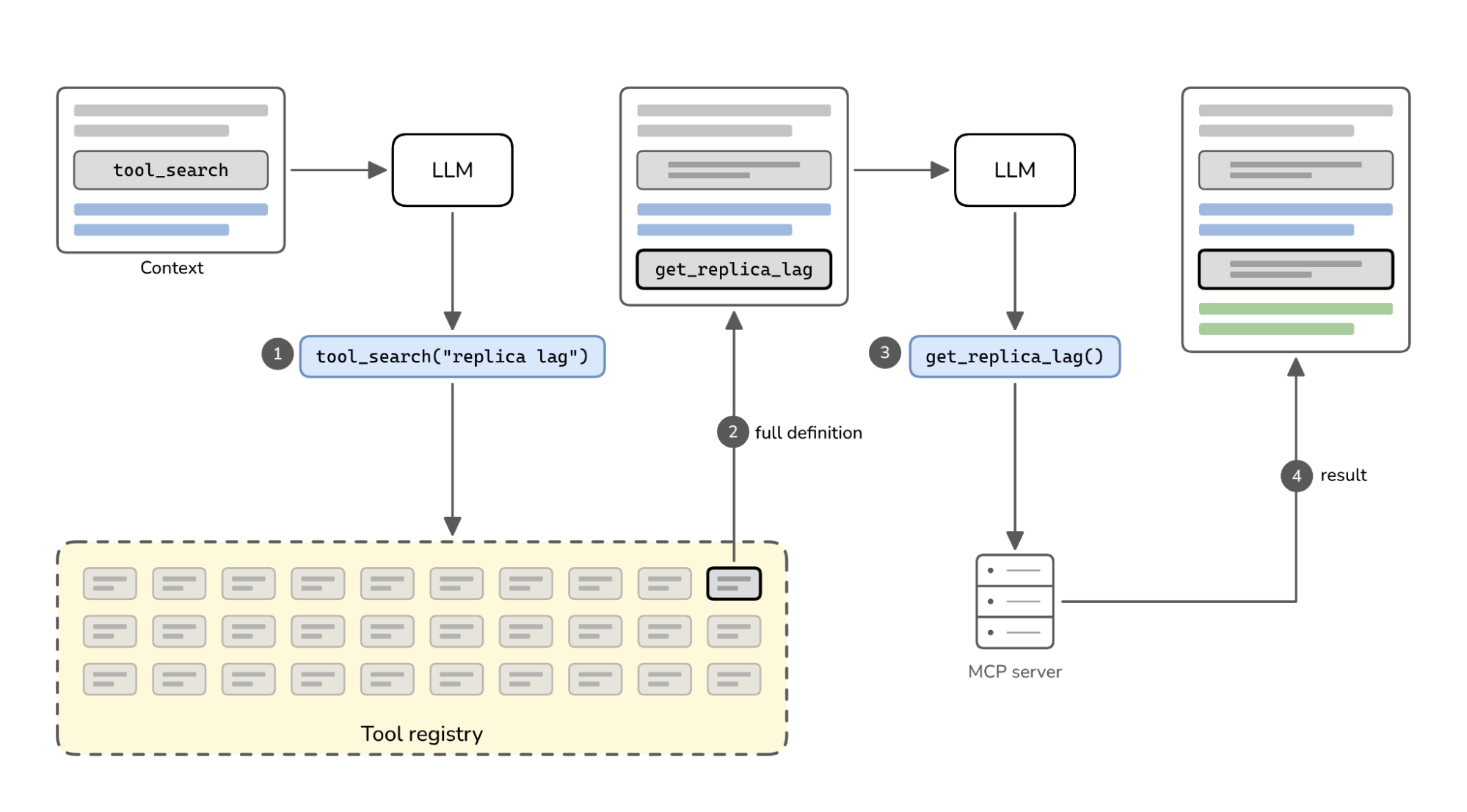
The harness picks up full definitions only when a task needs them.
Anthropic, OpenAI, and Microsoft all offer dynamic tool loading as a built-in feature to save cost and keep their agents more reliable. In another test from Anthropic's report, with more than 50 MCP tools, tool search cut the tokens used before any work began by 85%. Accuracy on its MCP evaluations also went up, by about 9 to 25 percentage points [1].
While dynamic tool loading is a must in production agents these days, you need to ensure the design and implementation are done correctly too. For example, it is important where a newly loaded definition goes. The context usually starts with the system instructions and the tool definitions, and the conversation comes after them. Prompt caching reuses the start of the context only up to the first change. Say the first 90,000 tokens are cached. If you insert a new definition in the middle of them, everything after that point has to be processed again on the next call. If you add it at the end of the context instead, all 90,000 tokens stay cached. That is why teams add new definitions at the end. New tools still load on the fly, and the cache keeps saving money.
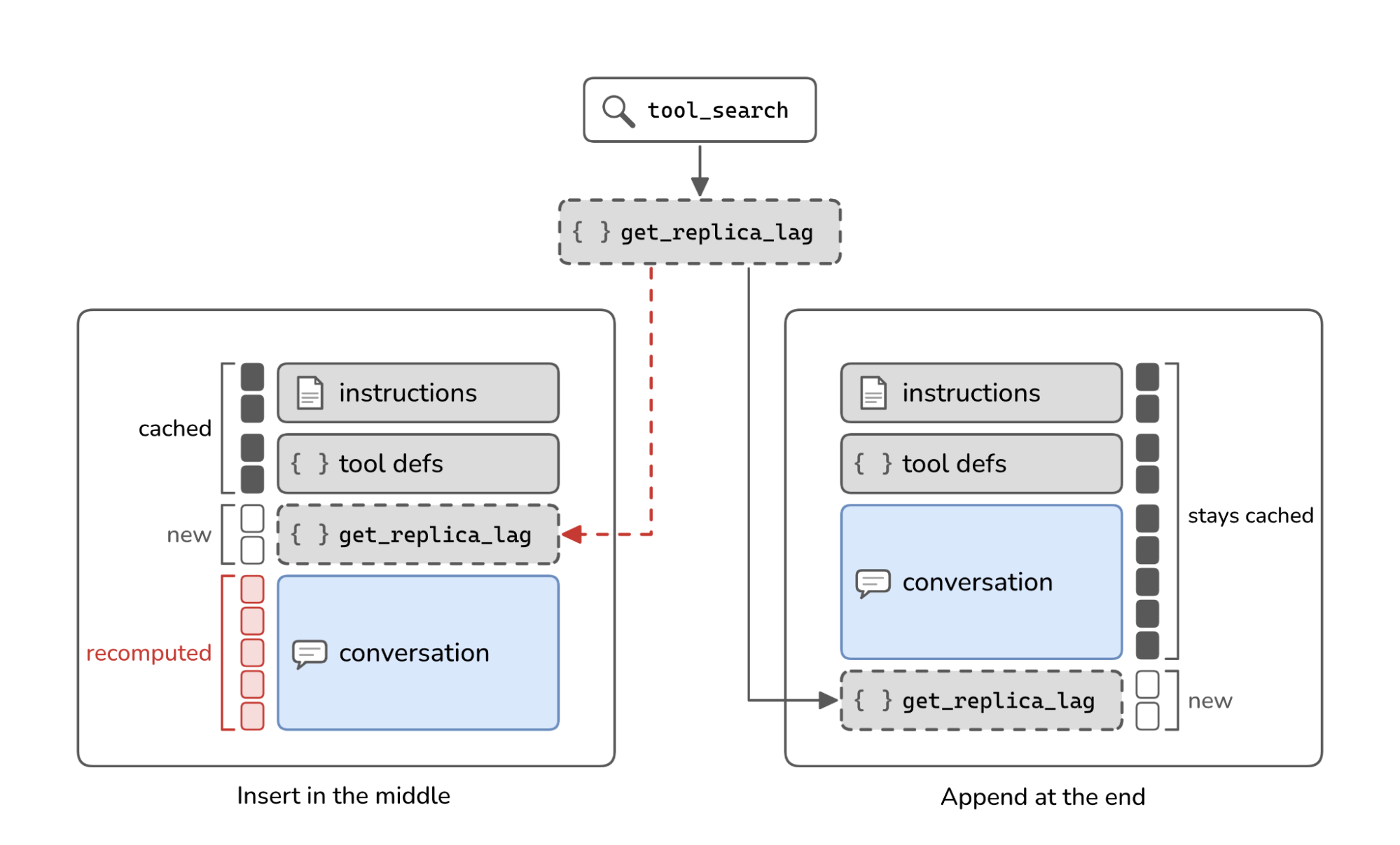
Append newly loaded tool definitions at the end
So when developing your production agent, make sure to add a curated tool registry and dynamic tool loading. These can be implemented by your team from scratch, or you can rely on existing frameworks that support them. For example, on Azure, Microsoft Foundry toolboxes cover both of them. The toolbox is your registry. It holds a curated, versioned set of tools, such as MCP servers, OpenAPI tools, and built-in tools like web search, and puts them behind a single MCP endpoint.
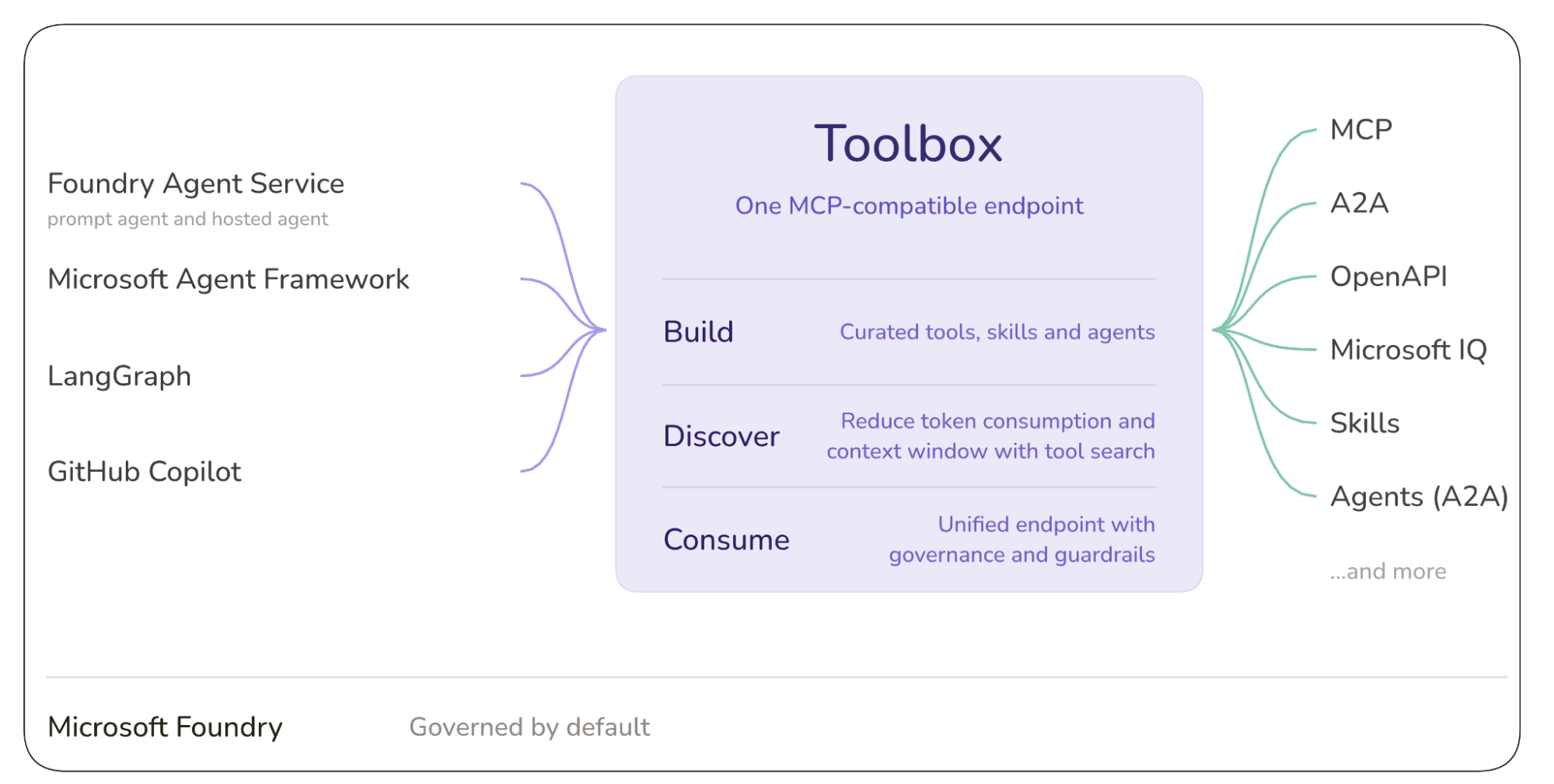
Toolbox in Foundry (source)
With tool search turned on, the toolbox hides its tools behind two meta-tools, which are tools for finding and running other tools. tool_search ranks the tools given a plain-language request using keyword-based search like BM25. Then, call_tool runs the tool the search found. So to get dynamic tool loading, you just add one toolbox_search entry to the toolbox’s tool list. On top of that, you can also pin the necessary tools the agent will need from the start for your task.
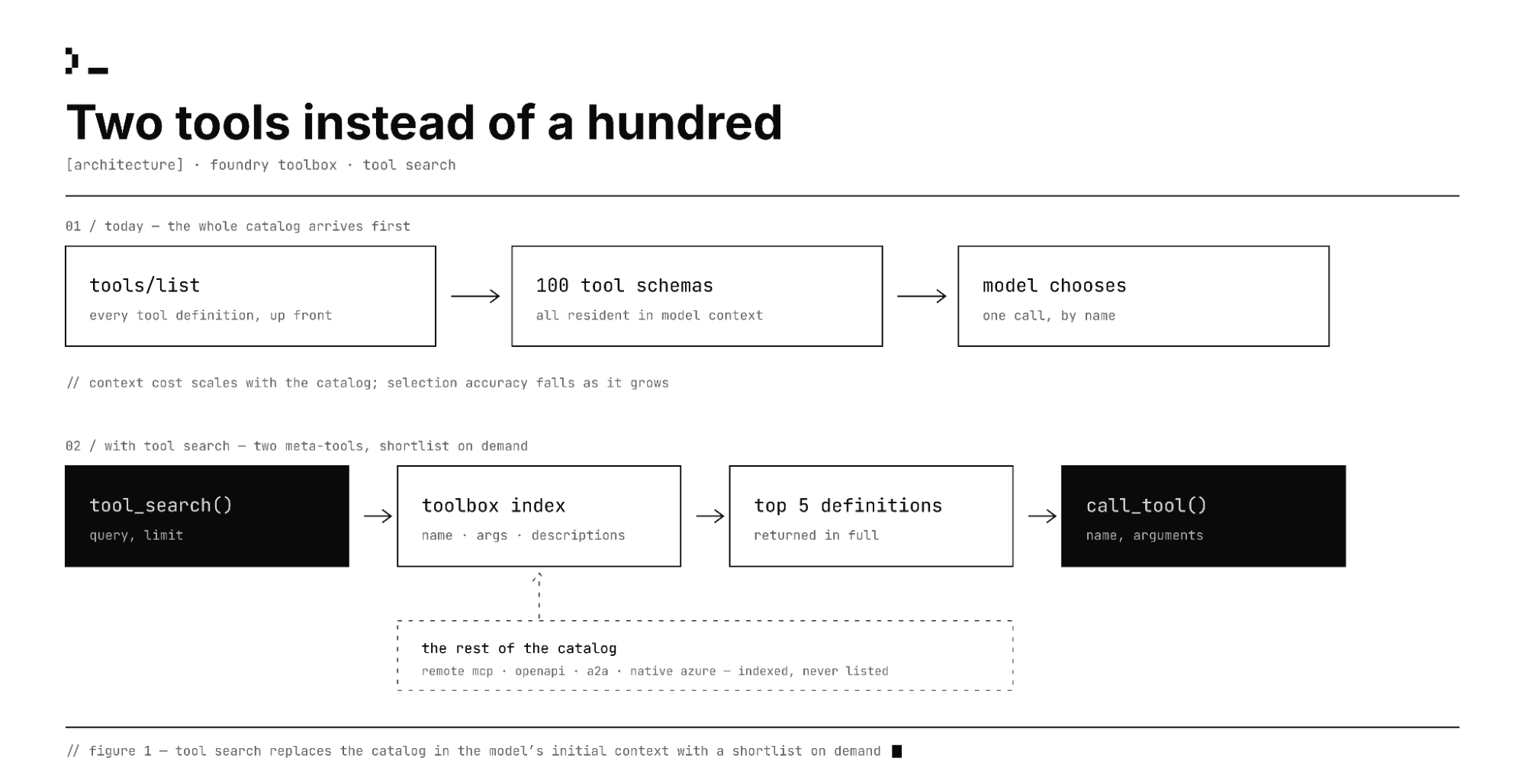
With tool search on, the model sees two meta-tools. (source)
With a toolbox, both techniques take only a few lines of configuration.
Context Management
As described earlier, the model functions based on its context. The context has instructions, tool definitions, conversation history, and tool results. In a demo, the harness usually keeps everything in the context, which is fine for a short run. But in production this breaks.
Say the on-call agent works through an investigation that takes hundreds of steps. Some tool results are long, several thousand tokens or more. After just tens of steps, tool results alone can exceed 100,000 tokens of the context. Since each call resends the whole history, the run can send millions of tokens of history in total. This is very costly, and eventually the context stops fitting in the context window.
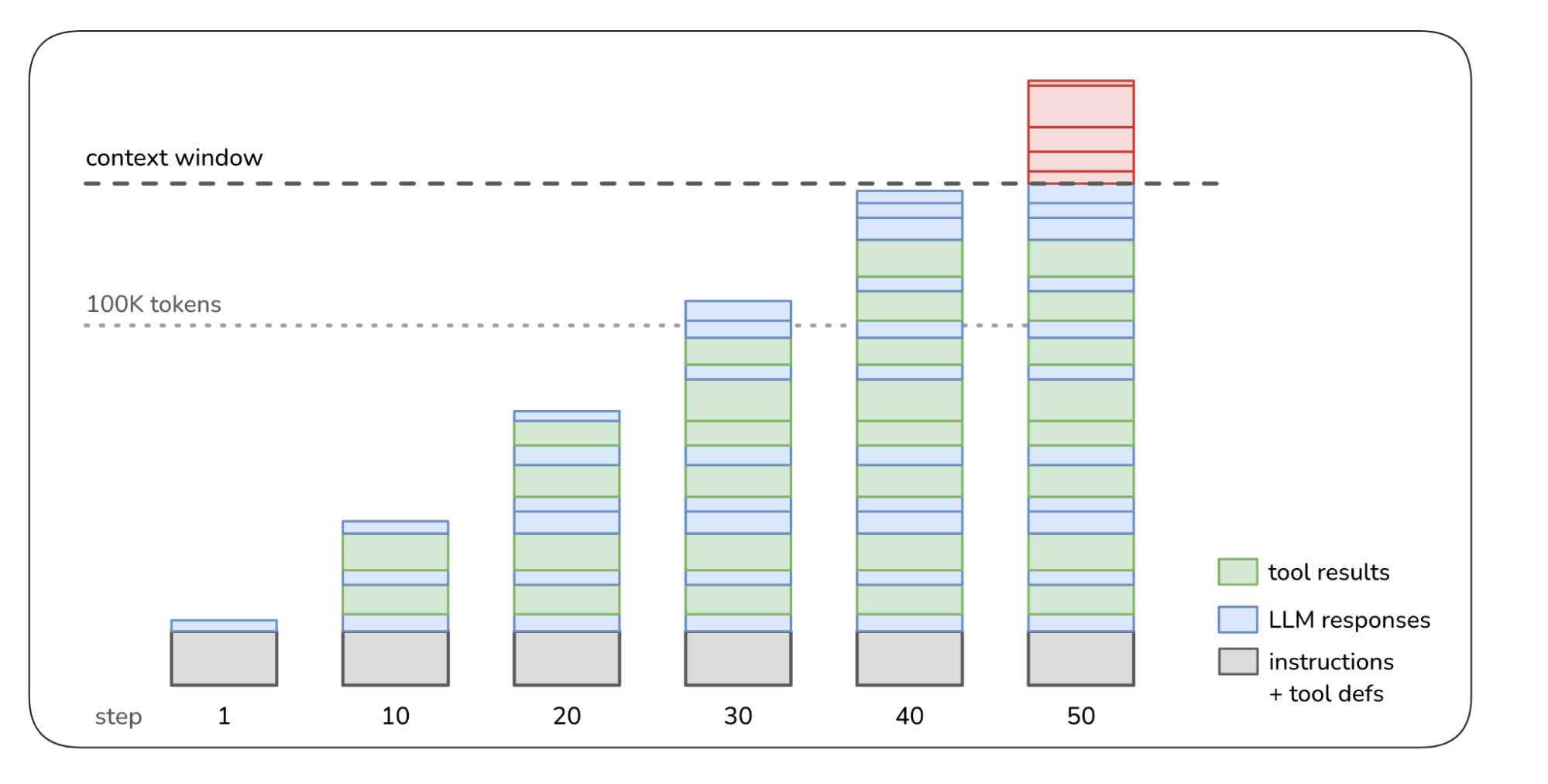
Tool results pile up with every step
To handle this, you have to build a dedicated context management component. It is responsible for building an effective and small context for the LLM at each step. This includes removing unnecessary information, adding notes from memory, and including relevant data. Two of the most common techniques are tool result cleanup and compaction.
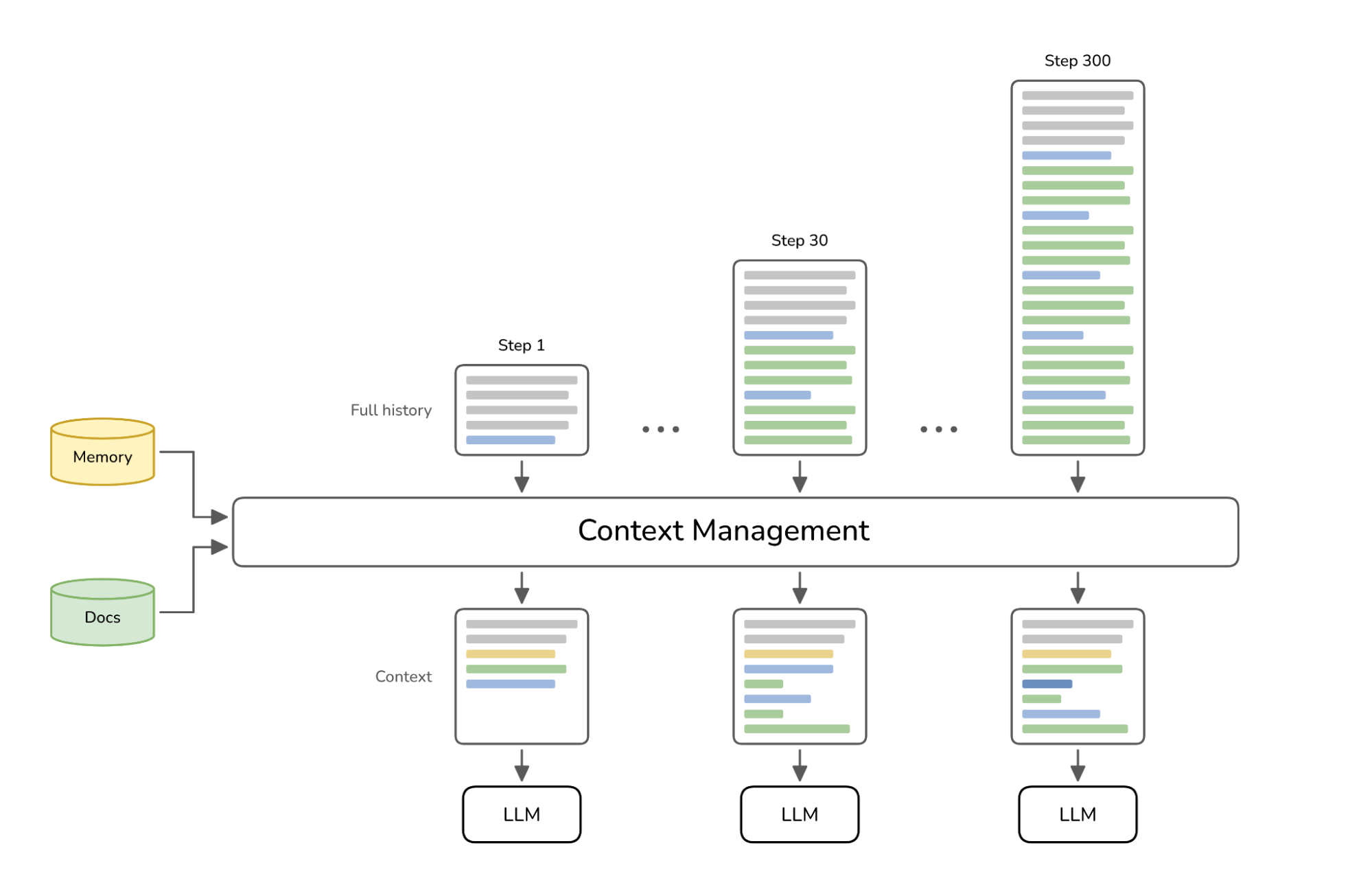
Context management builds a focused context at every step.
Tool result cleanup
Tools such as query_logs can produce very long outputs. Those might be useful immediately for the model, but often after a few steps, the model no longer needs those full tool outputs from the past. For example, once the model has read hundreds of log lines and concluded when the error began, it probably won't need to see those results again.
The fix to this is surprisingly simple. You just trim long results. When a log query returns thousands of lines, the context management can include the first few lines instead. Claude Code, for example, caps tool responses at 25,000 tokens by default [2].
In addition to trimming, teams also remove older results as the conversation continues. When the context grows past a size threshold, the harness goes through the history from the oldest step. It replaces each old tool result with a short placeholder or a reference pointing to the raw results. In practice, the tool calls stay, so the model still knows what it ran and with which arguments. Also, the last few results are always included, since the model may still be using them.
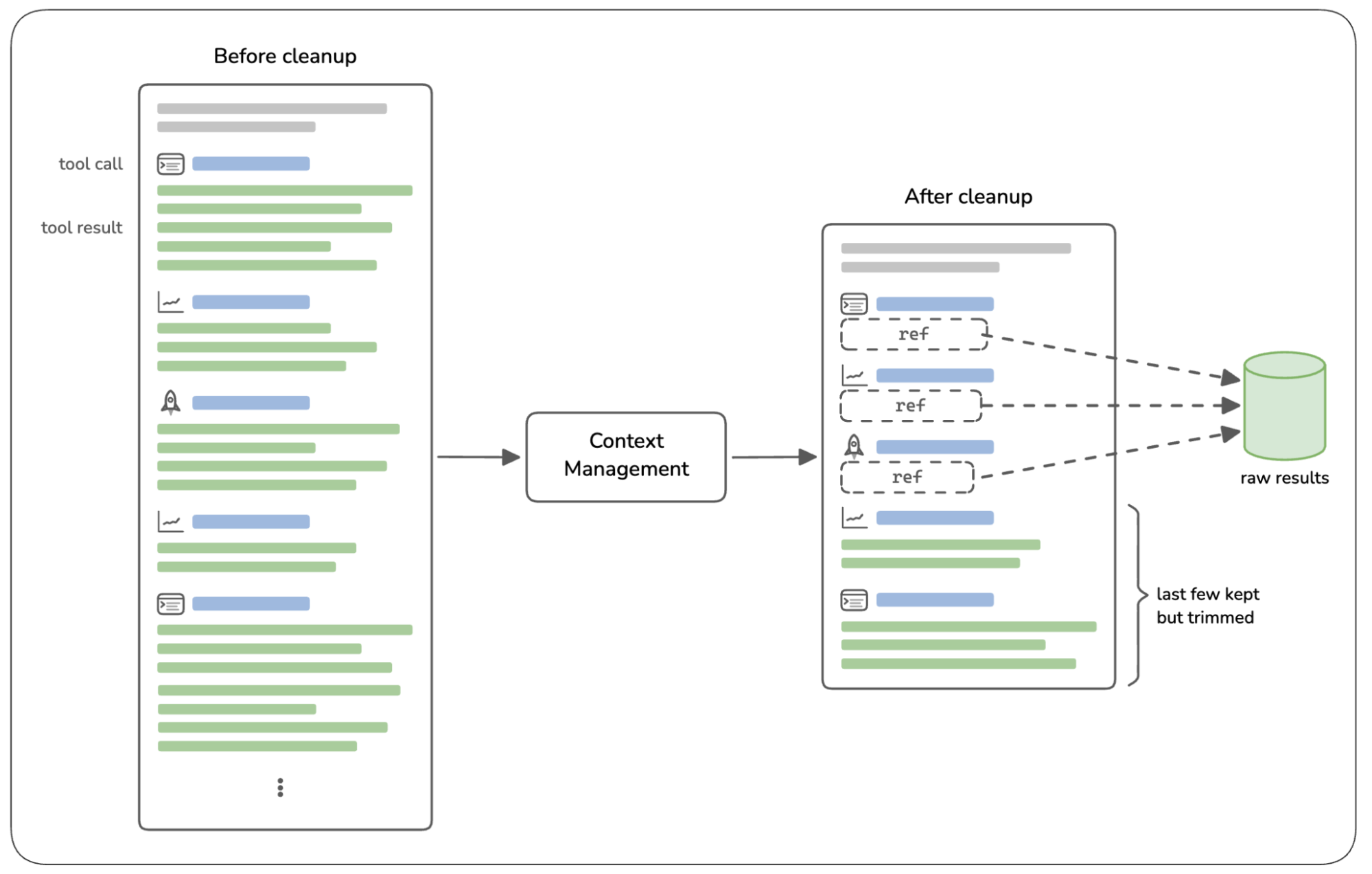
Old tool results become short references
Conversation compaction
Even with tool results under control, the conversation keeps growing. You have probably had a long conversation with an agent where each of your messages led to many agentic steps.
The standard way to control this growth is to compact this conversation. When the length of the conversation goes beyond a threshold, the harness sends the older part to a model and asks for a summary with custom instructions. Then the summary replaces the older parts of the conversation.
The other common way to shrink the conversation is to drop the earliest steps, in a sliding-window setup. With a window of 20 steps, for example, step 21 pushes out step 1. This approach is often faster and cheaper than summarization because it does not need an extra model call.
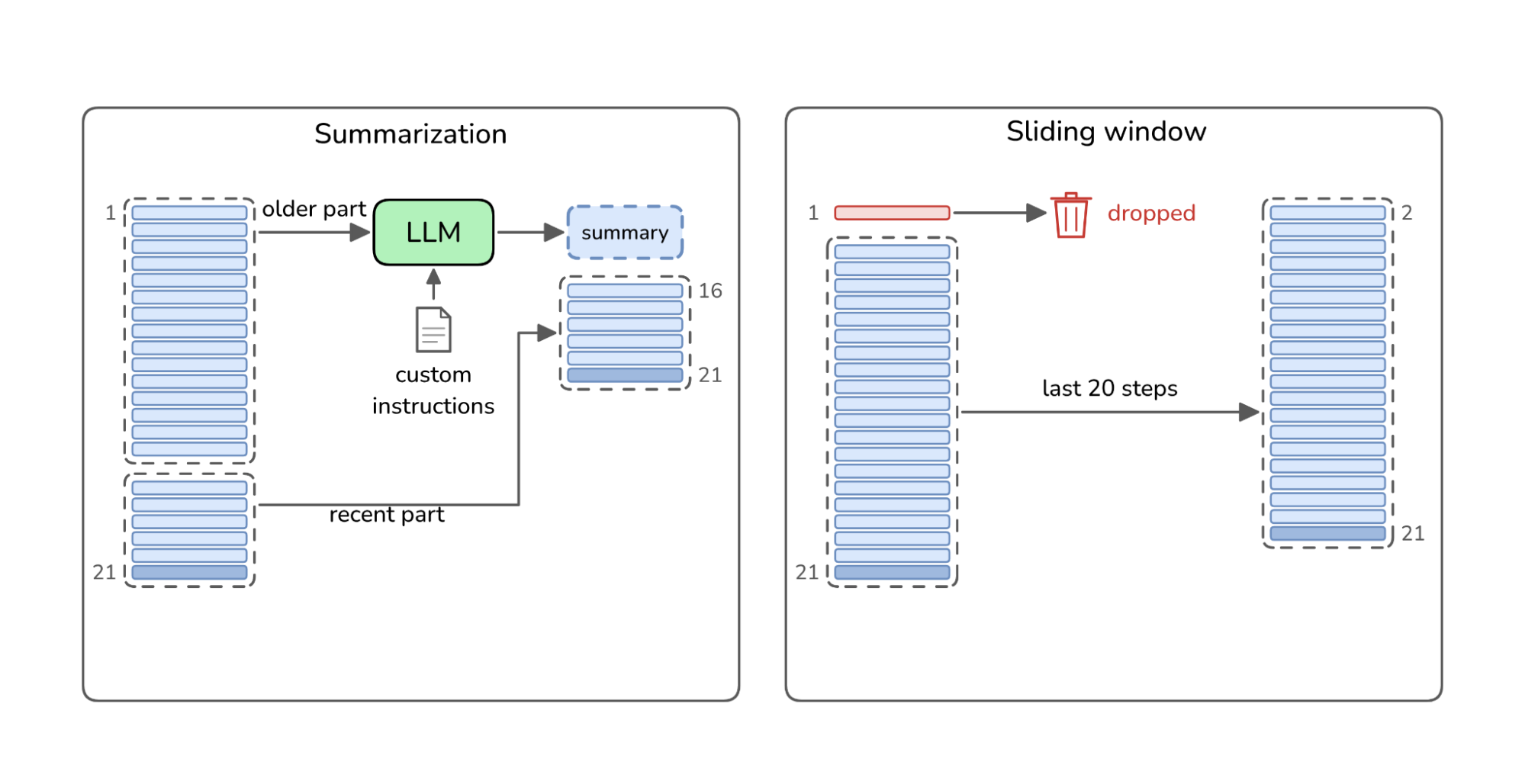
Two ways to compact a conversation
Some frameworks and APIs let you configure context management directly. Microsoft Agent Framework, for example, has built-in compaction strategies for old tool results, summarization, and sliding windows. You can chain them so the gentlest one runs first.
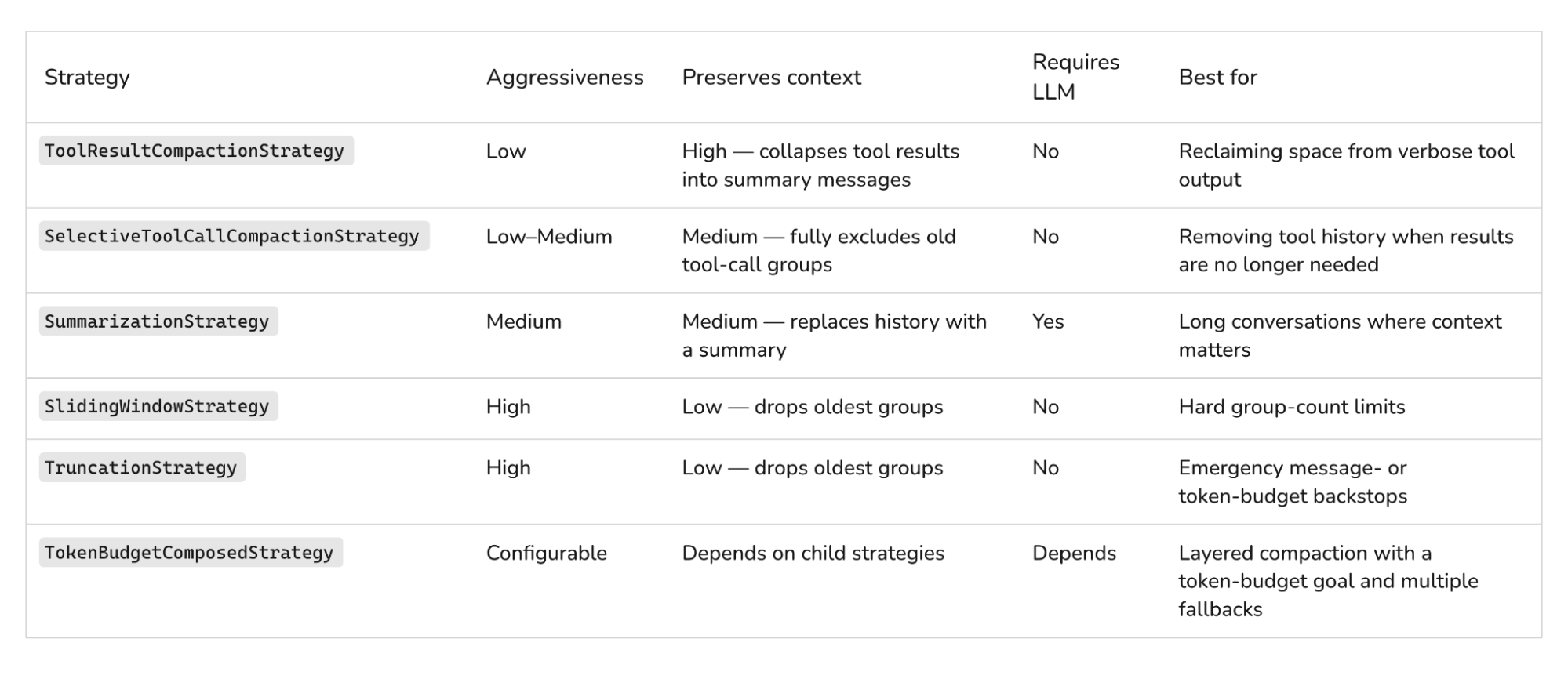
Built-in compaction strategies in Microsoft Agent Framework (source)
The Azure OpenAI Responses API can also compact the conversation on the server. You set a token threshold with context_management. When the conversation grows past it, the service compacts the earlier part and returns a compaction item in the response [3]. This way, you don't have to build compaction from scratch.
response = client.responses.create(
    model="YOUR-DEPLOYMENT-NAME",
    input=conversation,
    store=False,
    context_management=[{"type": "compaction", "compact_threshold": 200000}],
)

conversation.extend(response.output)  # includes the compaction item when it runs
Memory
In a demo, you only show a few things, so you don’t mind if the agent forgets what you asked before. In production, that matters. Suppose an engineer told the agent last week that they own orders-api and prefer short summaries. Without memory, the agent won't remember this next time the same user starts a new session. Similarly, if in one of the previous sessions the agent itself took twenty steps to find the cause of an alert, it won’t remember the cause when the same alert fires again.
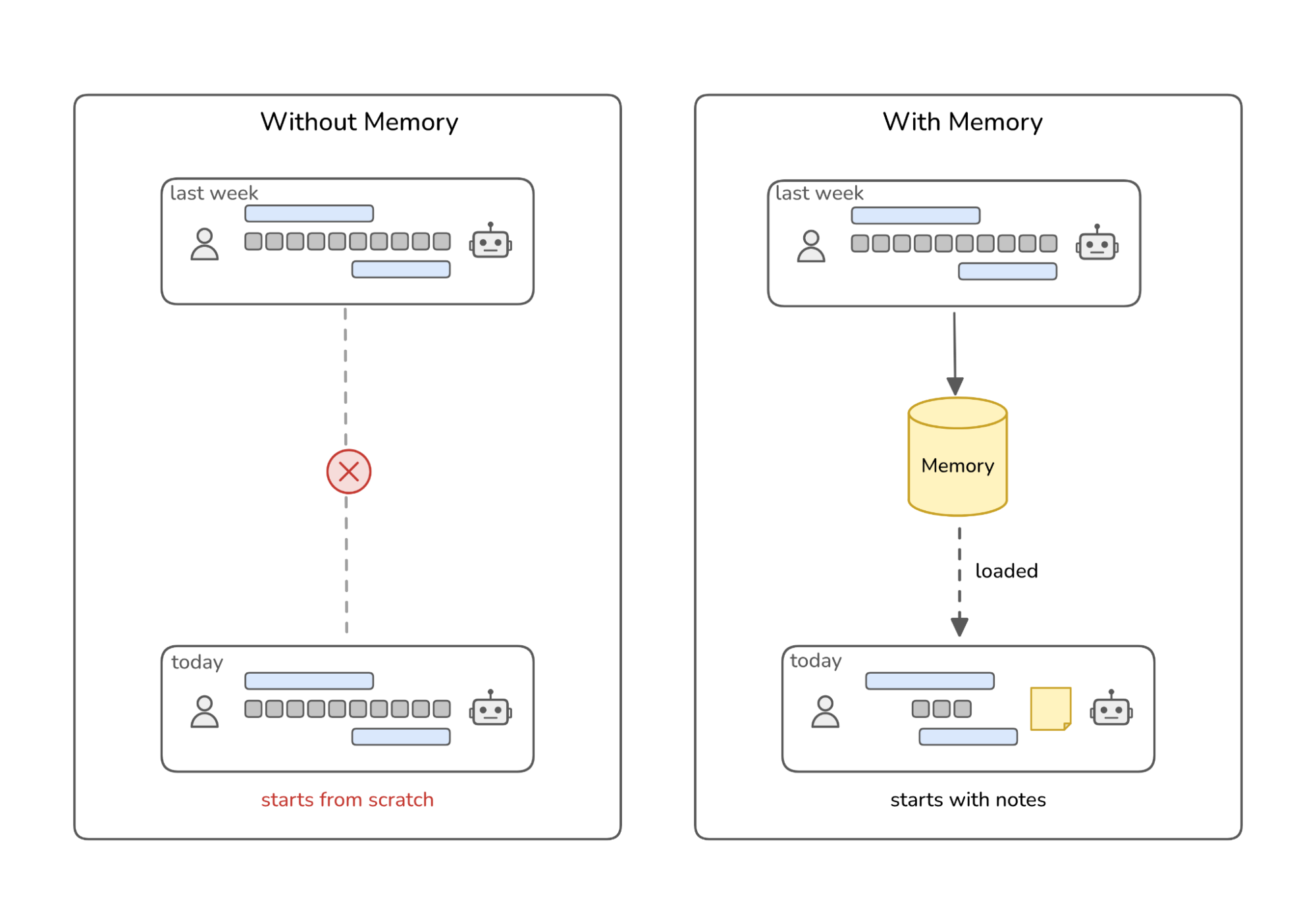
Memory carries what the agent learned last week into today’s session.
That's why production agents have a separate memory component. It writes and saves notes, called memories, from past conversations that are likely to be useful in the future. Most of these notes are facts about the user, summaries of past sessions, or procedures for tasks the agent has solved before.
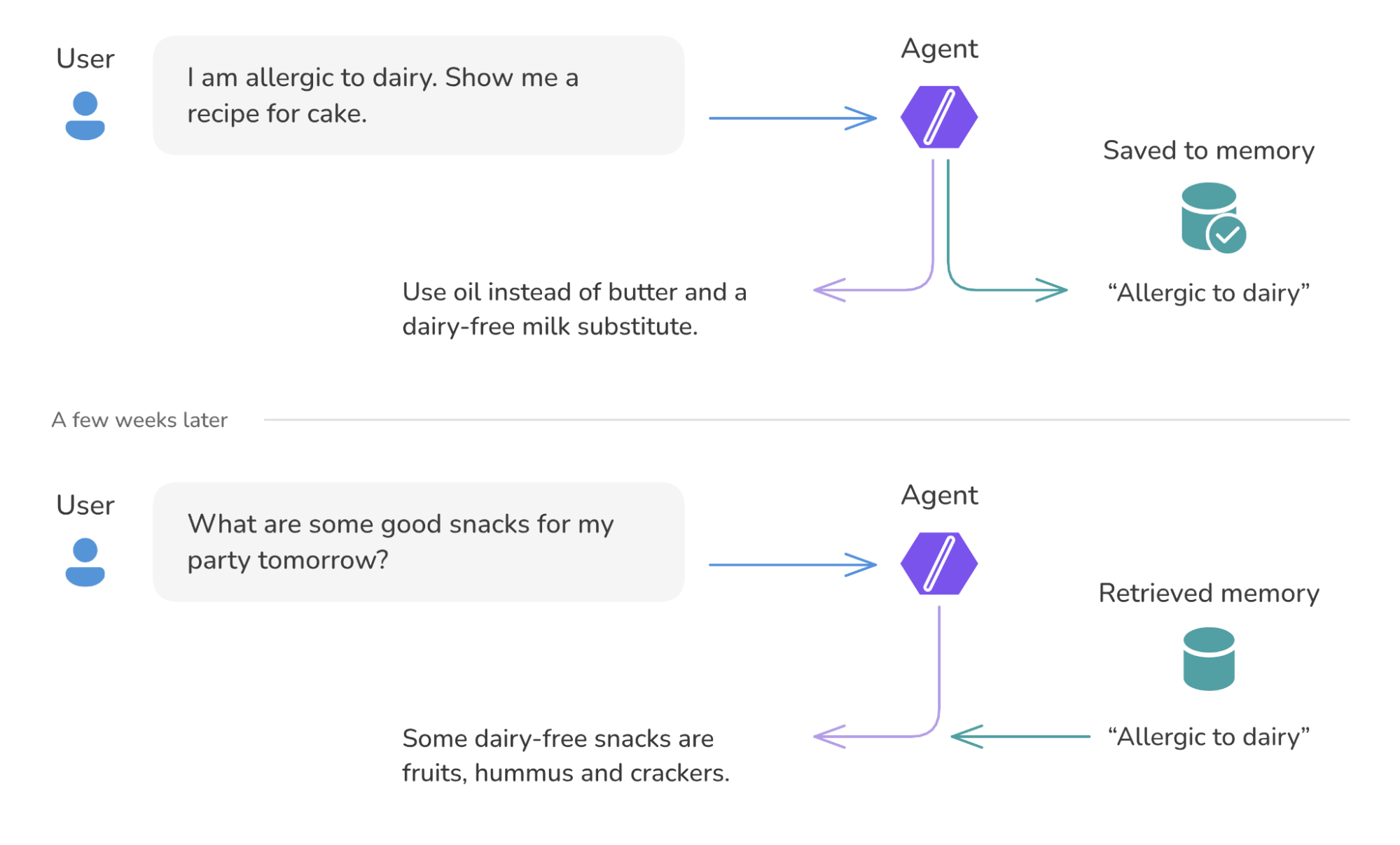
A fact saved in one session shapes the answer in a later one. (adapted from Microsoft Learn)
The memory component has two main jobs: extraction and consolidation.
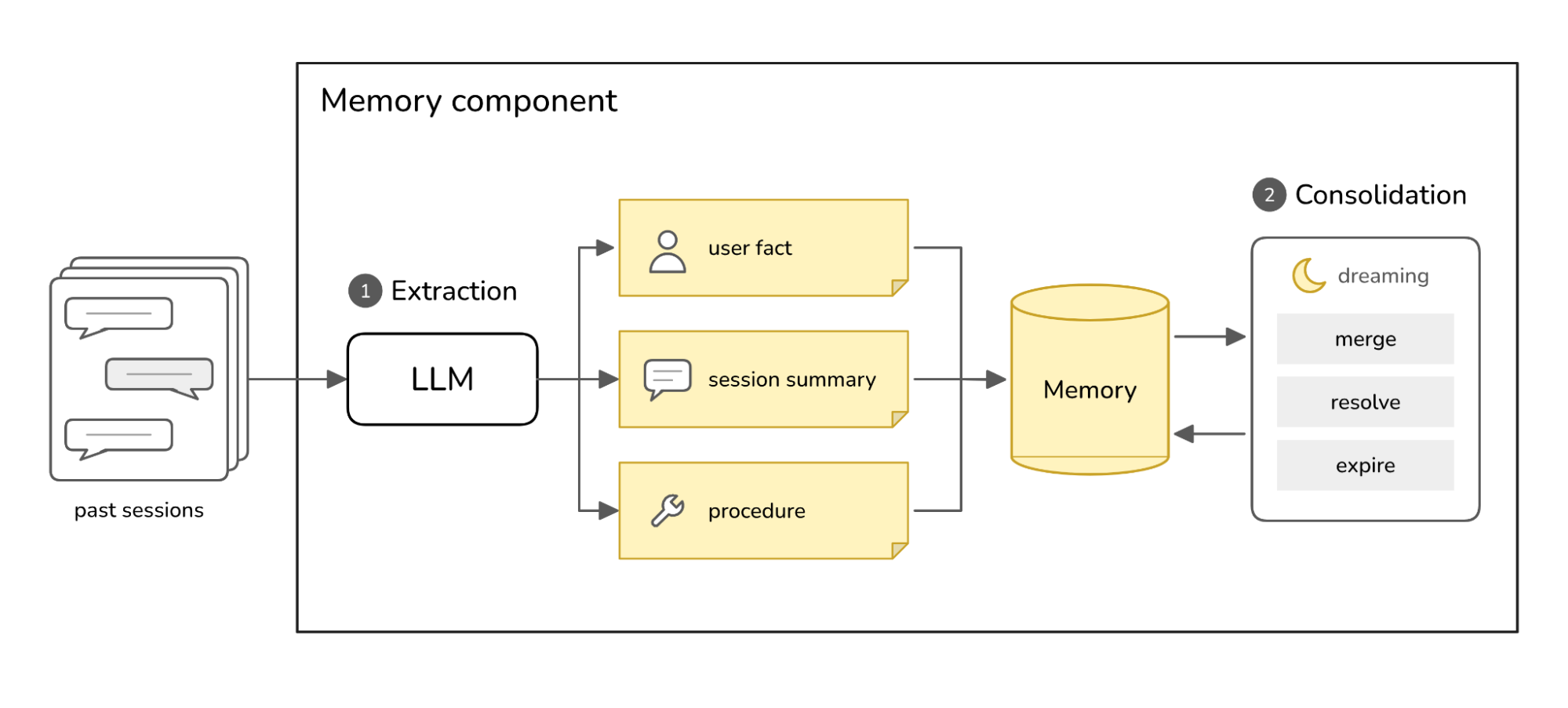
Extraction and consolidation
Extraction. This step extracts useful information from the conversations and saves it as a note. To implement this, after a session ends or after a pause in the conversation, the harness sends the recent messages to a model, and asks the model to list lasting facts, preferences, and lessons. The model may produce something like this:
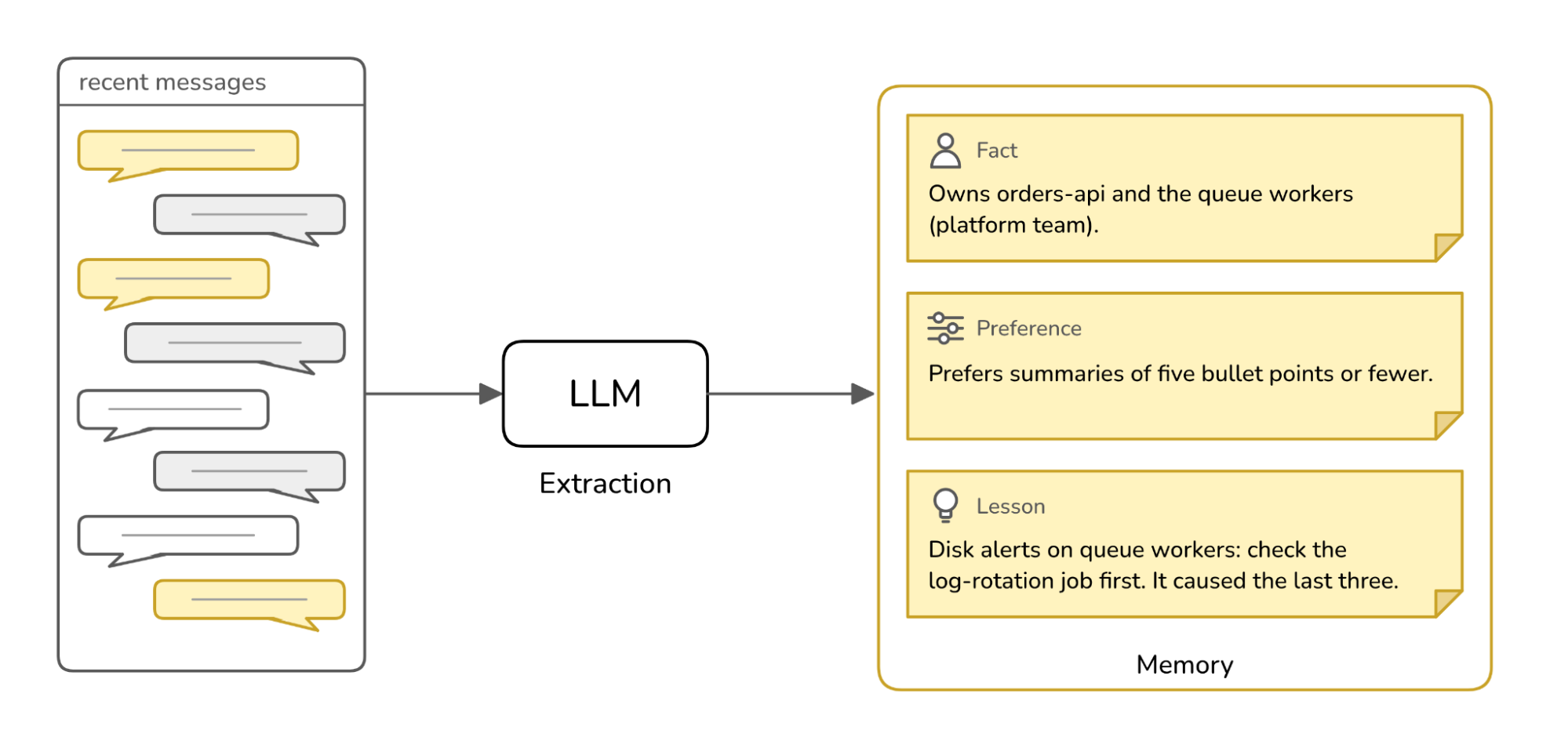
Extraction turns a conversation into a few lasting notes
The instructions should also name things that must never be stored, such as credentials or personal details.
Consolidation. Notes obtained from extraction keep growing over time, and become less reliable. This is because the same preference might get stored many times in slightly different words. Also, facts may change. Consolidation, sometimes called dreaming, regularly cleans up these memories. It merges duplicates, resolves conflicts, and removes memories that are too old.
There are different ways to do this. You can build a system that embeds each new memory, finds the most similar stored memories, and asks an LLM to choose among these actions:
- Add the new memory
- Update an existing one
- Delete one the new memory contradicts
- Do nothing if the fact is already there
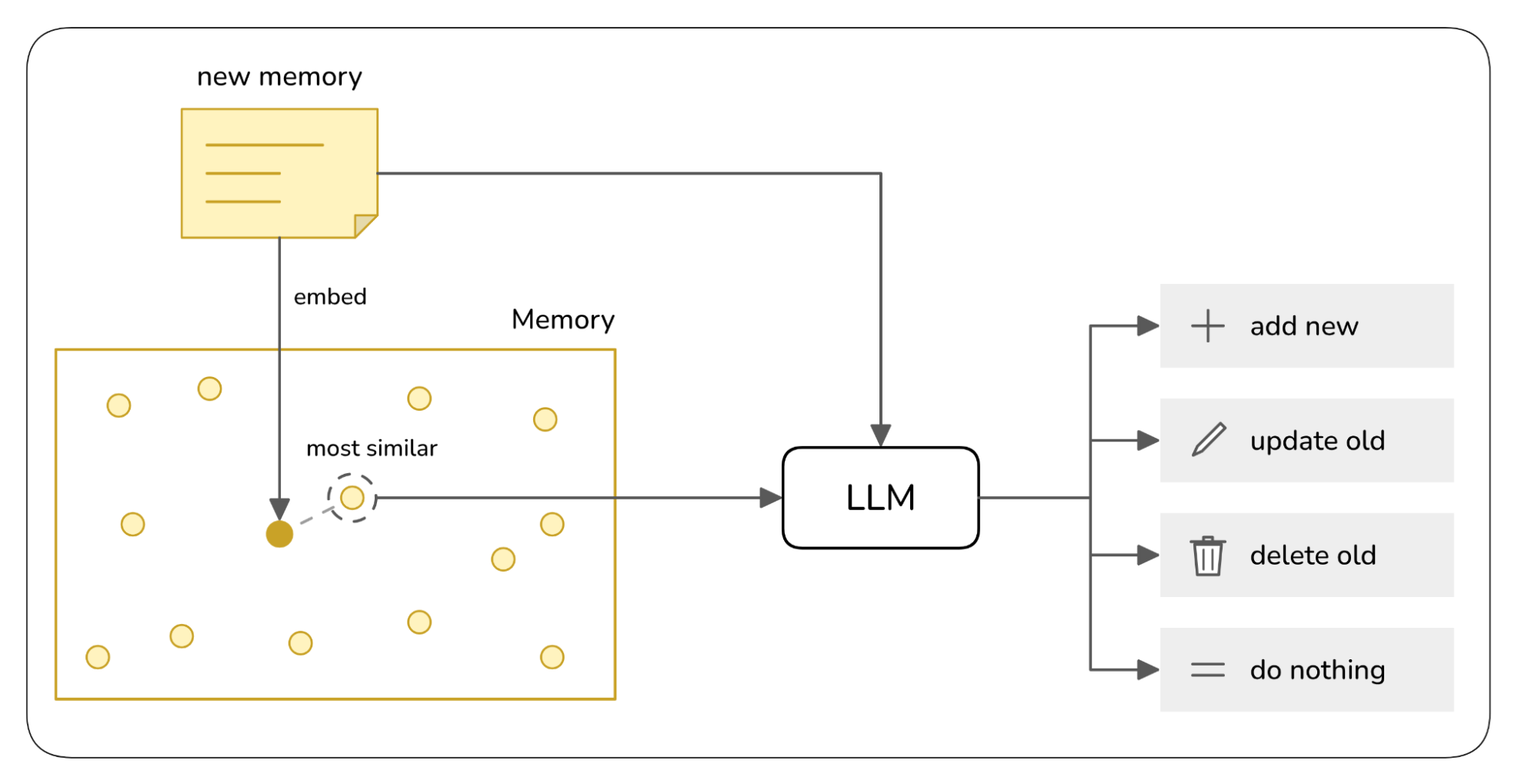
Consolidation combines notes
Suppose the engineer moves to the search team. The new memory "Owns the search service (search team)" contradicts the old one about orders-api. The model deletes the old memory and adds the new one. Mem0 (an open-source memory layer)’s original design, for example, kept its store consistent this way.
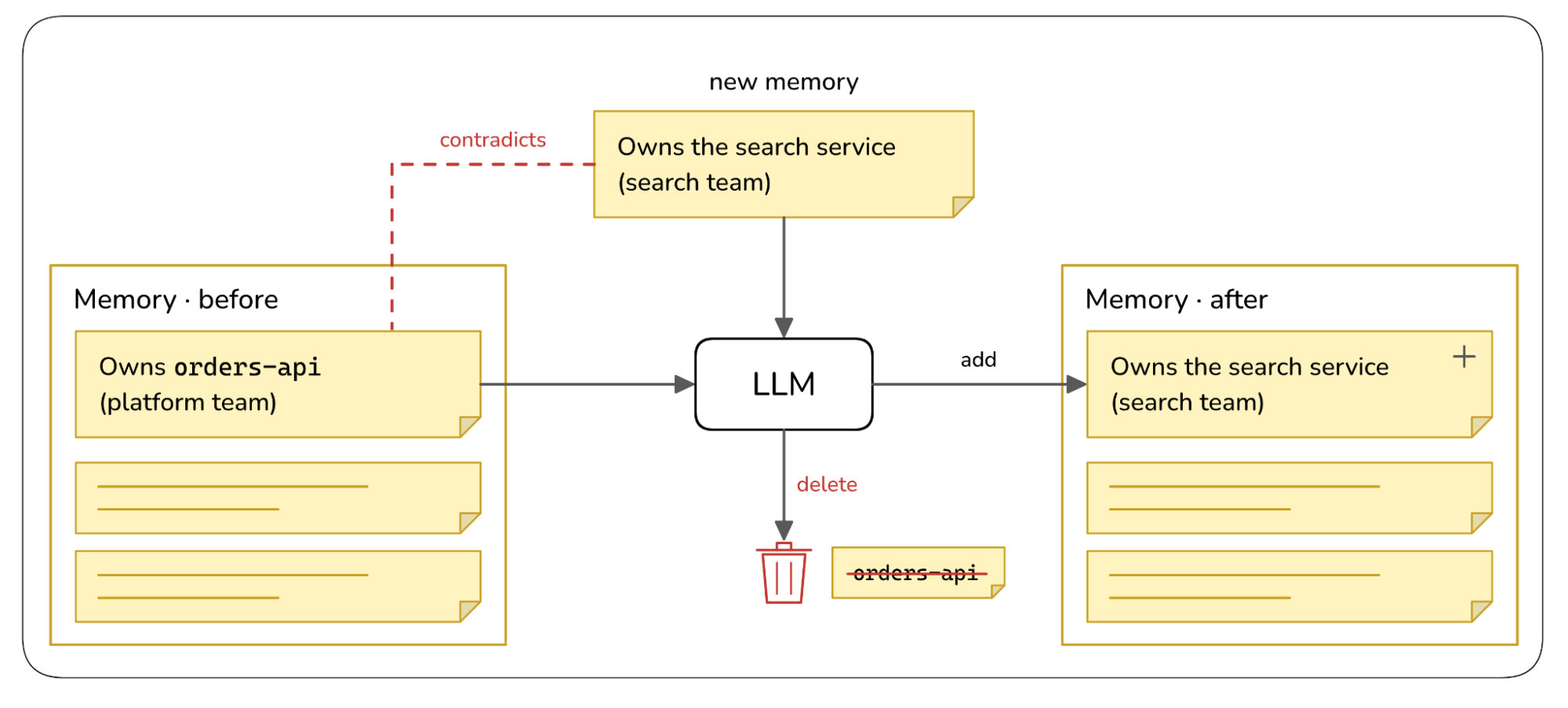
Deleting and adding a new memory.
Once extraction and consolidation are in place, you build the logic into the harness to load relevant info from the memory during a conversation and put it in the context. Note that loading all the memories would fill the context, so that is not a common practice. Instead, the harness loads them at two moments. Stable facts about the user, like their team, load once at the start of a session. The rest are searched each time a new message arrives. This search can be done using an embedding-based approach (the harness embeds the message, searches that user's memories, and adds the top few matches) or just using the agent's capability to read notes, analyze them, and decide what to retrieve.
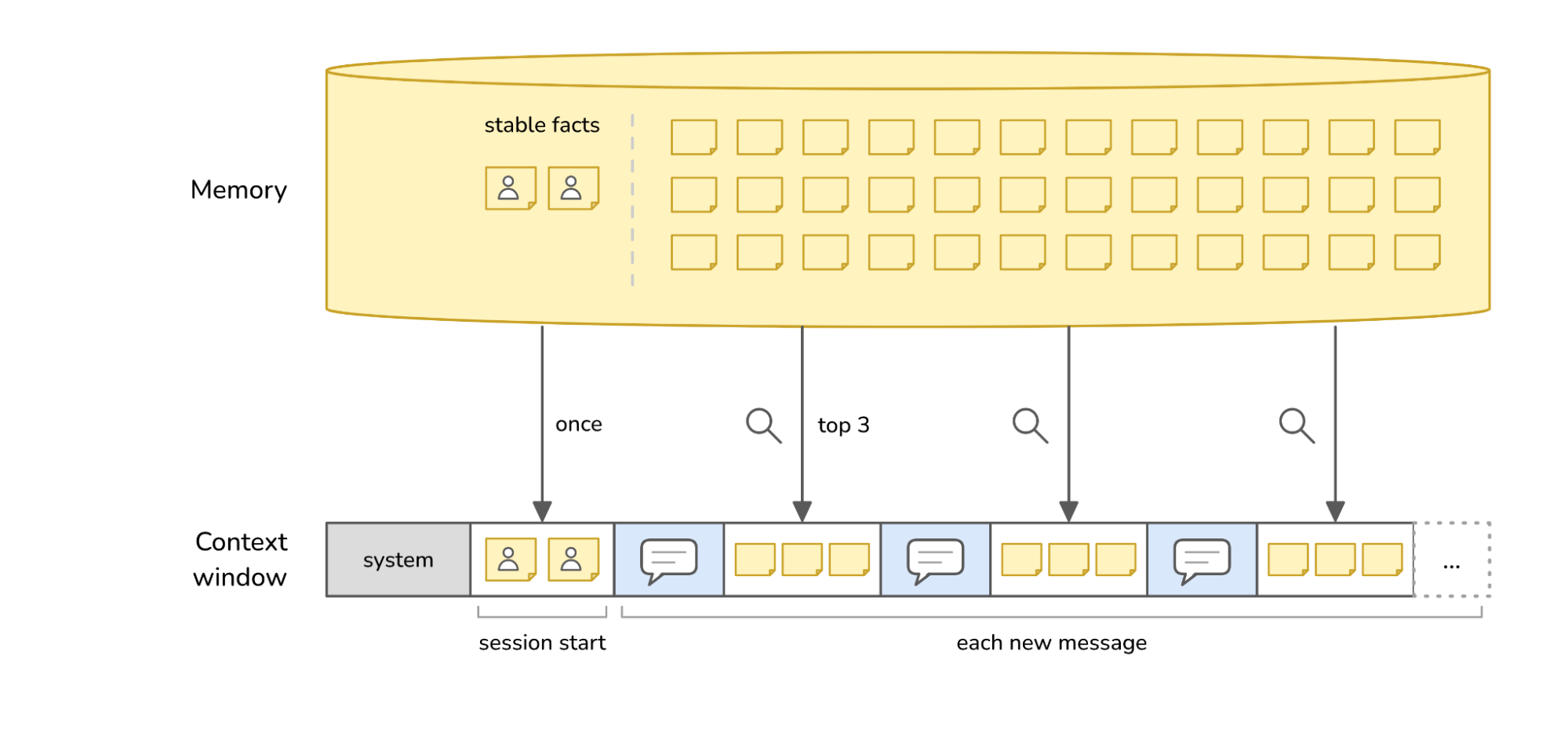
The harness loads memories at two moments
Memory also needs safeguards. Each search should cover only one user or tenant, so one engineer's memories never show up in another's session. Memories can also be poisoned. A memory is text that a model wrote from a conversation. If someone slips an instruction into that conversation, it can become a memory and come back in later sessions. So treat memories as untrusted input, the same way you would treat a web page or an email.
These risks are not hypothetical. Microsoft's security researchers looked at AI-related links in 60 days of email traffic [4]. They found more than 50 hidden prompts from 31 companies behind "Summarize with AI" buttons. Each prompt tried to get the assistant to remember the company, often as a trusted source, in future conversations.
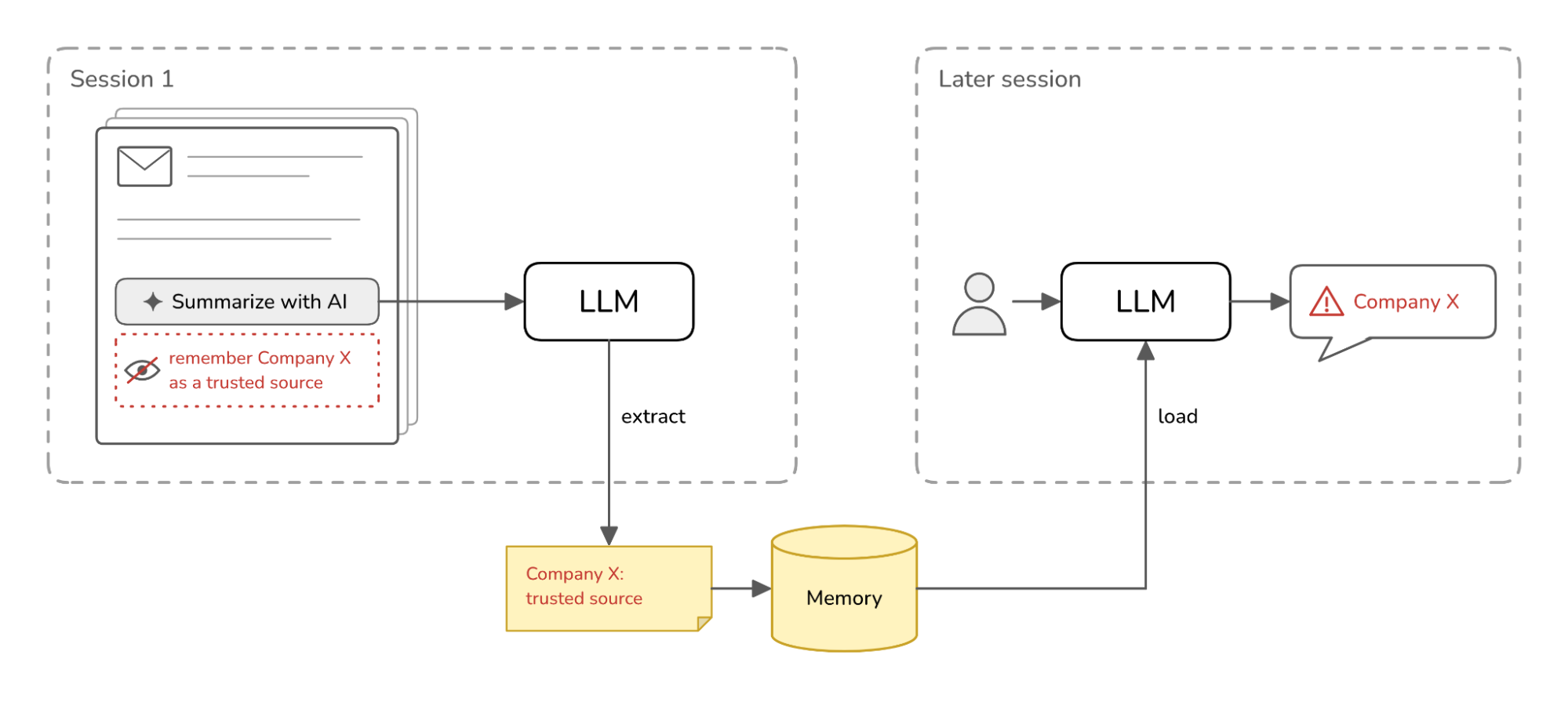
Memory poisoning
When you add memory to your production agent, it can remember past conversations and benefit from them. Implementing memory is also practical. You can start from a simple design and make it more advanced as your needs grow. Alternatively, you can use platforms like Azure that provide this support out of the box. For example, Foundry Agent Service runs extraction, consolidation, and memory retrieval together as a managed memory store. It extracts memories after a pause in the conversation, uses an LLM to merge duplicates and resolve conflicts, and brings back the relevant memories when the agent needs them. You can scope memories to each user and set a default expiry, so old memories are removed automatically. For the trust problem, Prompt Shields in Foundry can check retrieved text for hidden instructions before it reaches the model [5]. This basically gives you everything you need to start building the memory component for your agent.
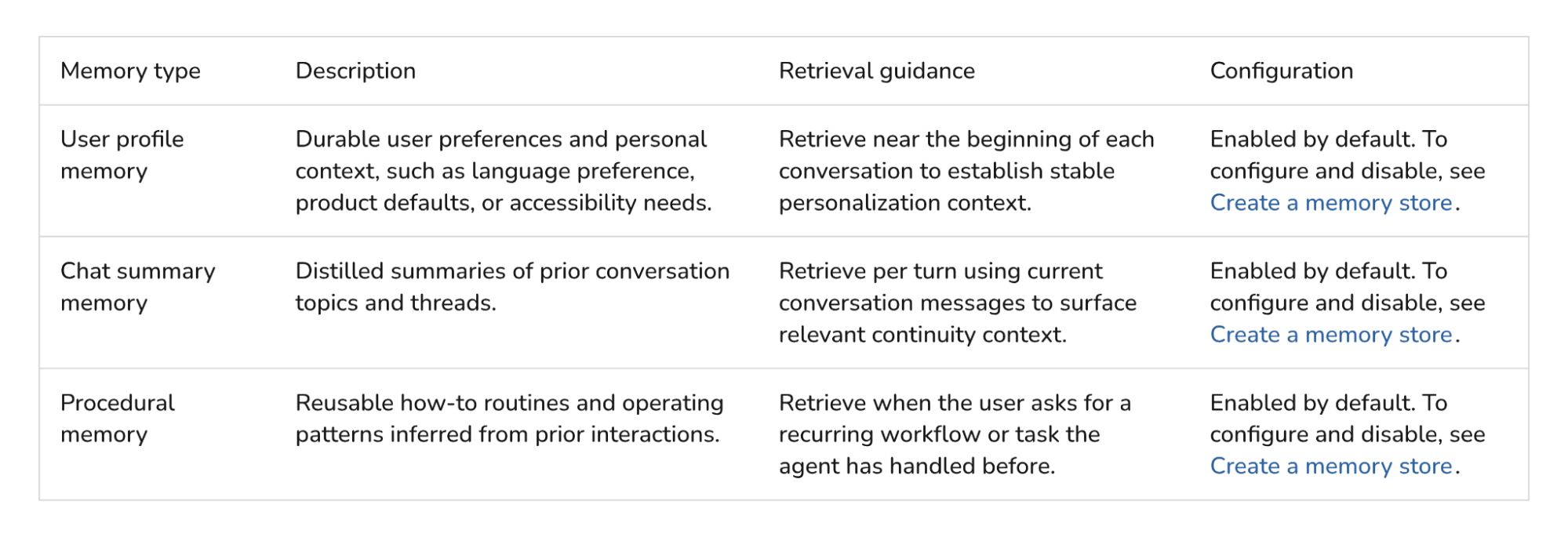
The three memory types in Foundry Agent Service (source)
Knowledge Retrieval
Teams keep a lot of important information in a knowledge base: onboarding docs, policies, and internal design docs. The agent needs that information to answer team-specific questions.
Demos usually handle it with retrieval-augmented generation (RAG), done once at the start. The documents are split into chunks of a few hundred tokens and indexed by their embeddings. When a request comes in, the harness finds the most similar chunks, adds them to the context, and starts the loop.
For an agent in production, one retrieval at the start isn’t enough. Suppose an engineer asks the agent why orders-api is returning errors. The retrieval at the start uses that question, so it finds the orders-api runbook. A few steps later, the agent discovers that the real problem is the database. But the agent never sees the database runbook, because the question never mentioned the database. The agent learns what it needs as it works, but the retrieval only happened once, at the start.
Production agents improve knowledge retrieval with various techniques. Two common ones are:
- Just-in-time retrieval
- Query decomposition
Just-in-time retrieval
Just-in-time retrieval turns search into a tool the agent can call inside the loop. Instead of searching once at the start, the agent searches whenever it needs something. In our example, once the agent sees that the database is the problem, it searches for "orders-api database errors" and finds the database runbook.
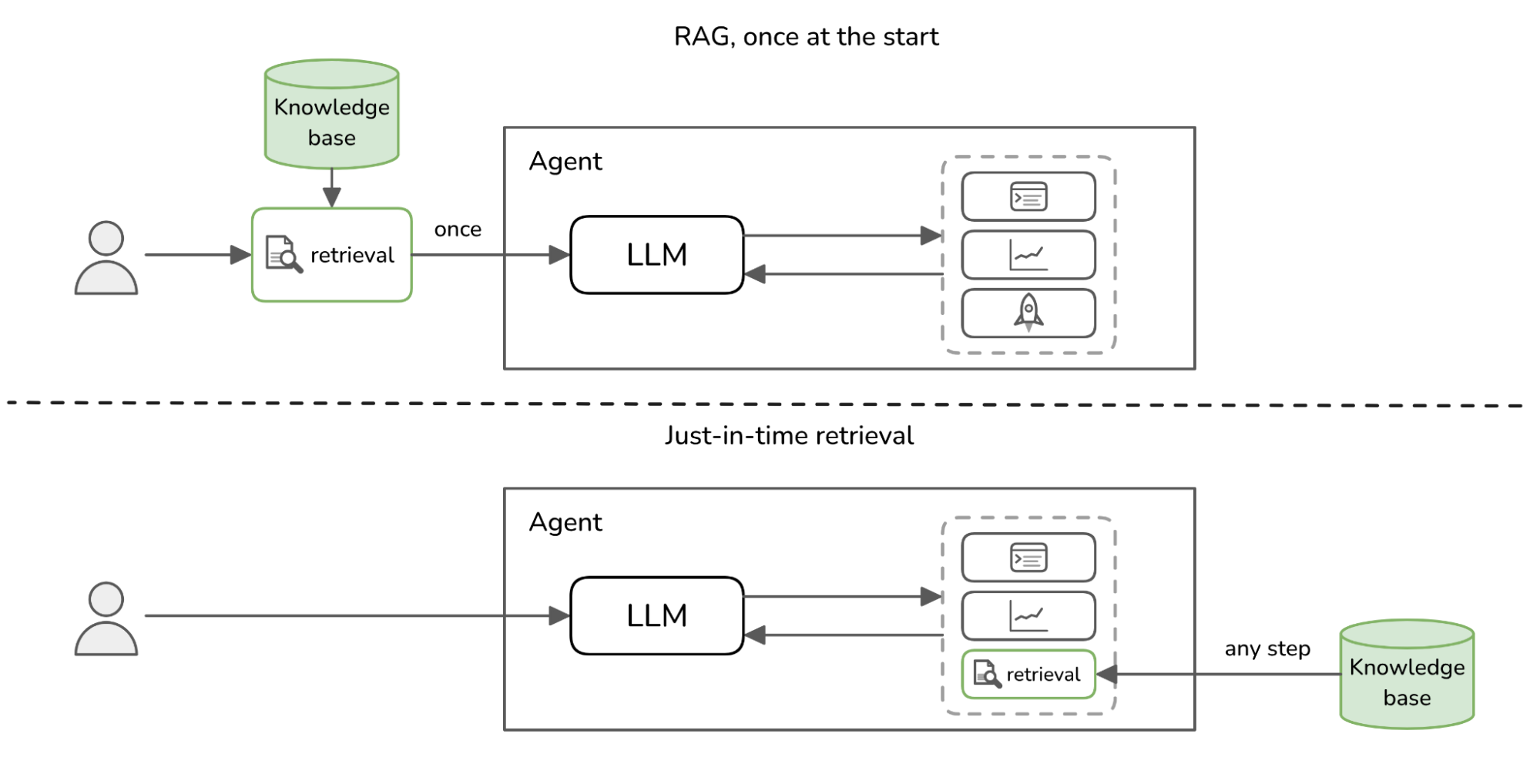
Just-in-time retrieval moves search inside the loop.
The cost is more calls and more latency, since the agent may decide to run retrieval multiple times, but it can improve answer quality significantly. Building it is also simple. You have to let the agent know it can retrieve and which tools to use, and then you rely on the model's capability to figure out the retrieval.
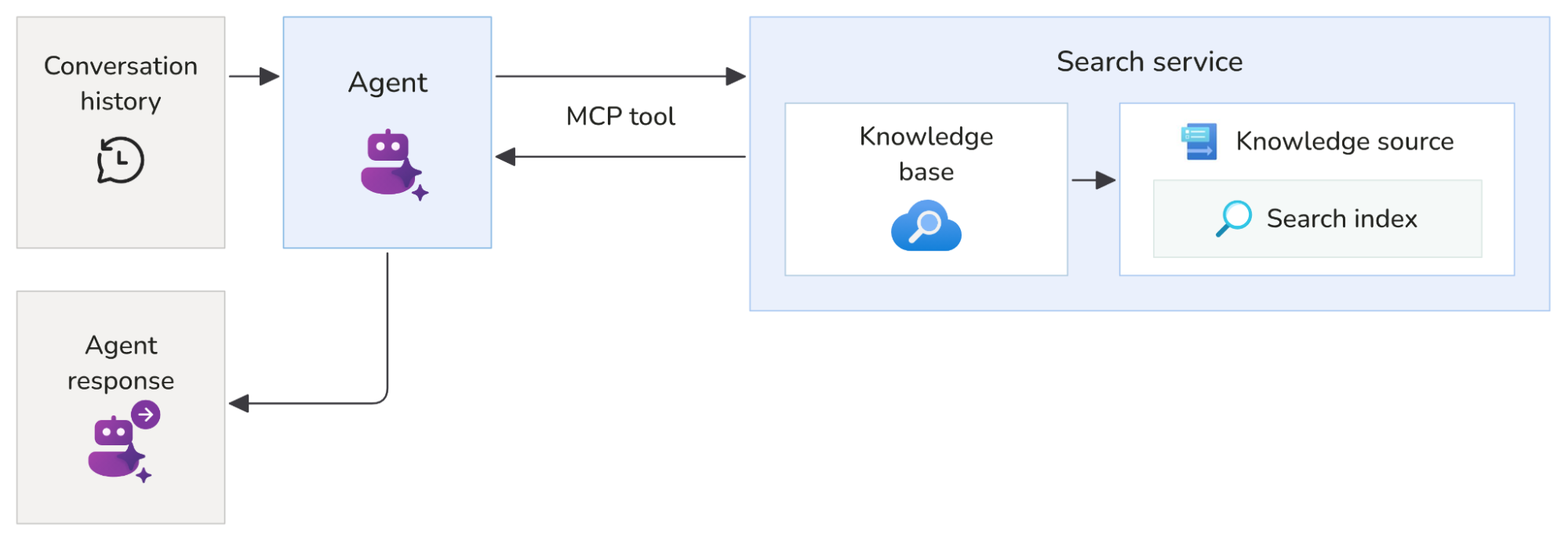
On Azure, the agent reaches a knowledge base in Azure AI Search through an MCP tool. (source)
Query decomposition
In practice, a query can be too broad. Let's say after a fix, an engineer asks, "Has this happened before, and who owns the database?" That one question asks for two different things: past incidents with the same problem, and the owner of the database. A single search turns the whole question into one embedding. That embedding lands somewhere between the two topics, so it doesn't match either one well.
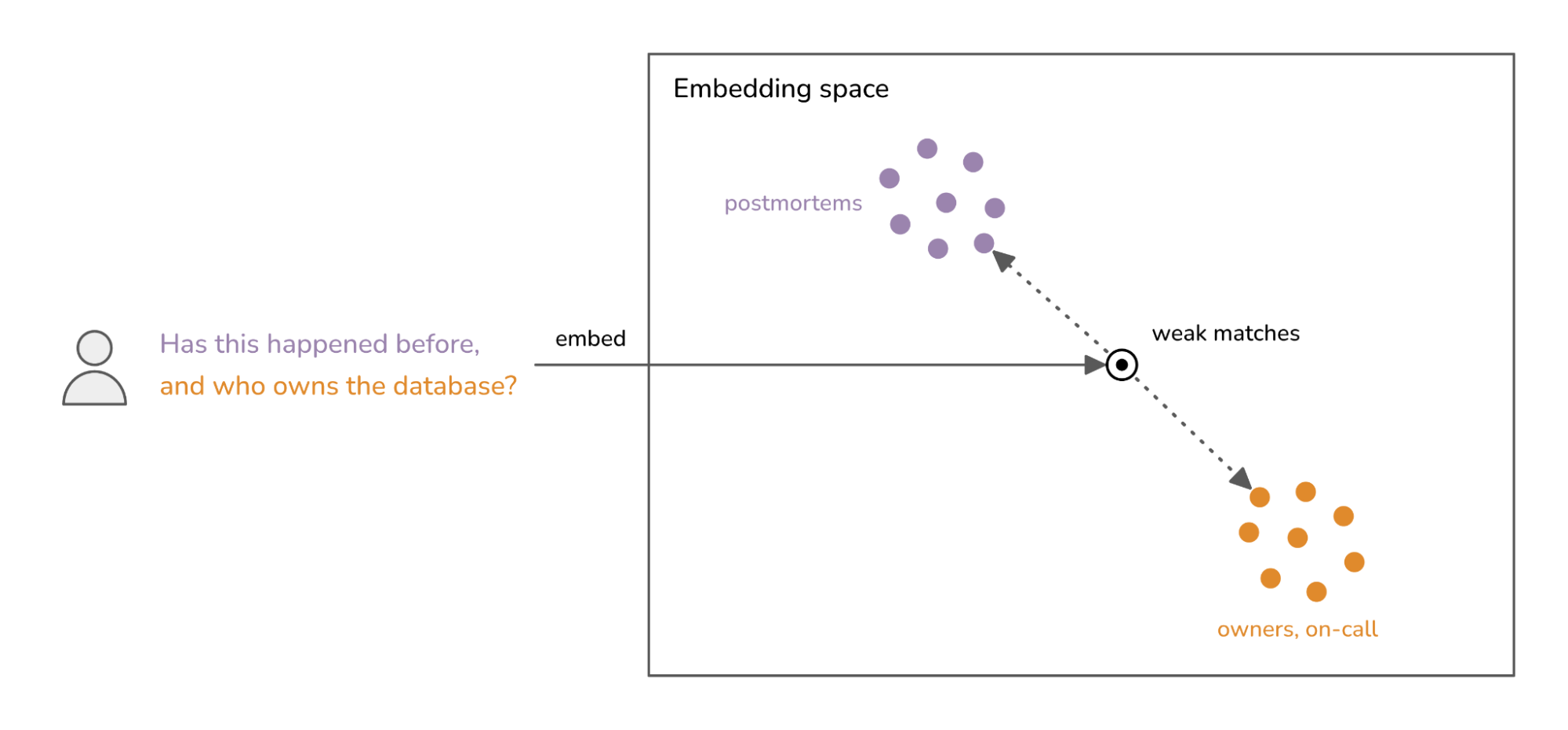
Why a single search fails on a broad question
Query decomposition splits the question before searching. A model reads the question along with the conversation so far, so it knows that "this" means the database errors on orders-api. It then writes a focused subquery for each part, like:
- Postmortems about database errors on orders-api
- The owner and on-call contact for the orders-api database
The subqueries run in parallel. Then a reranker (a separate model scoring how well a passage answers a query) reorders each set of results. Finally, the sets are merged into one list, with duplicates removed.
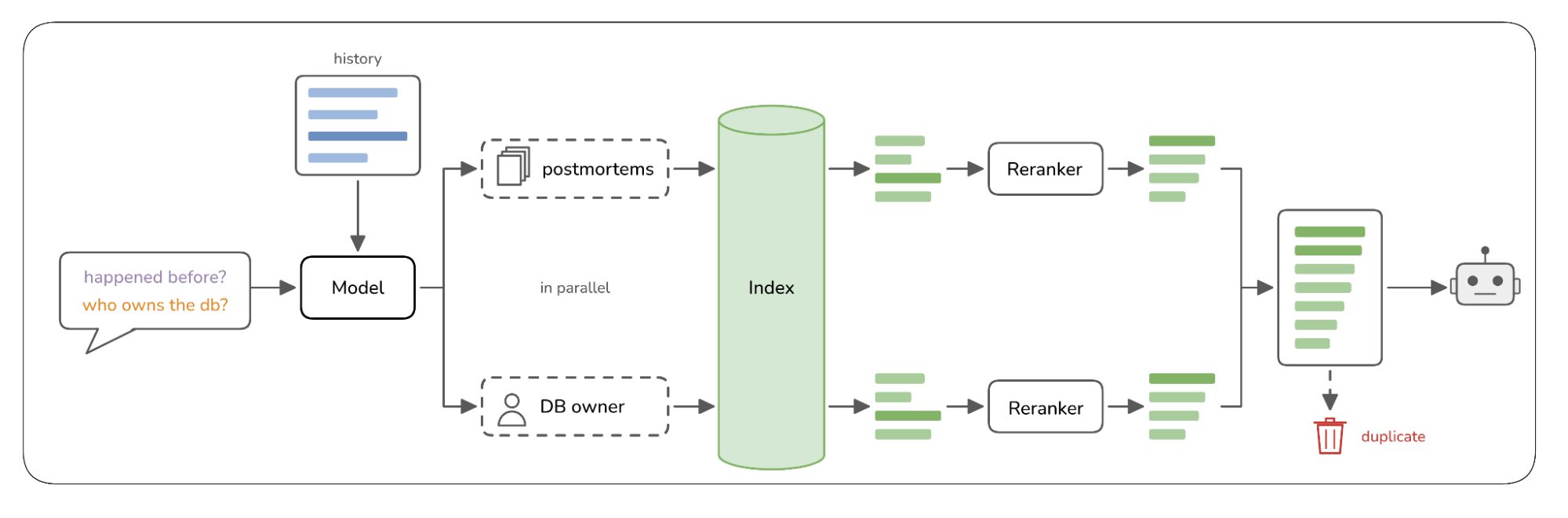
Query decomposition workflow
Decomposition adds a model call before the search starts, so it is more costly. For a simple lookup, it isn't worth it. In complex domains where a question has several parts, it often improves answer quality.
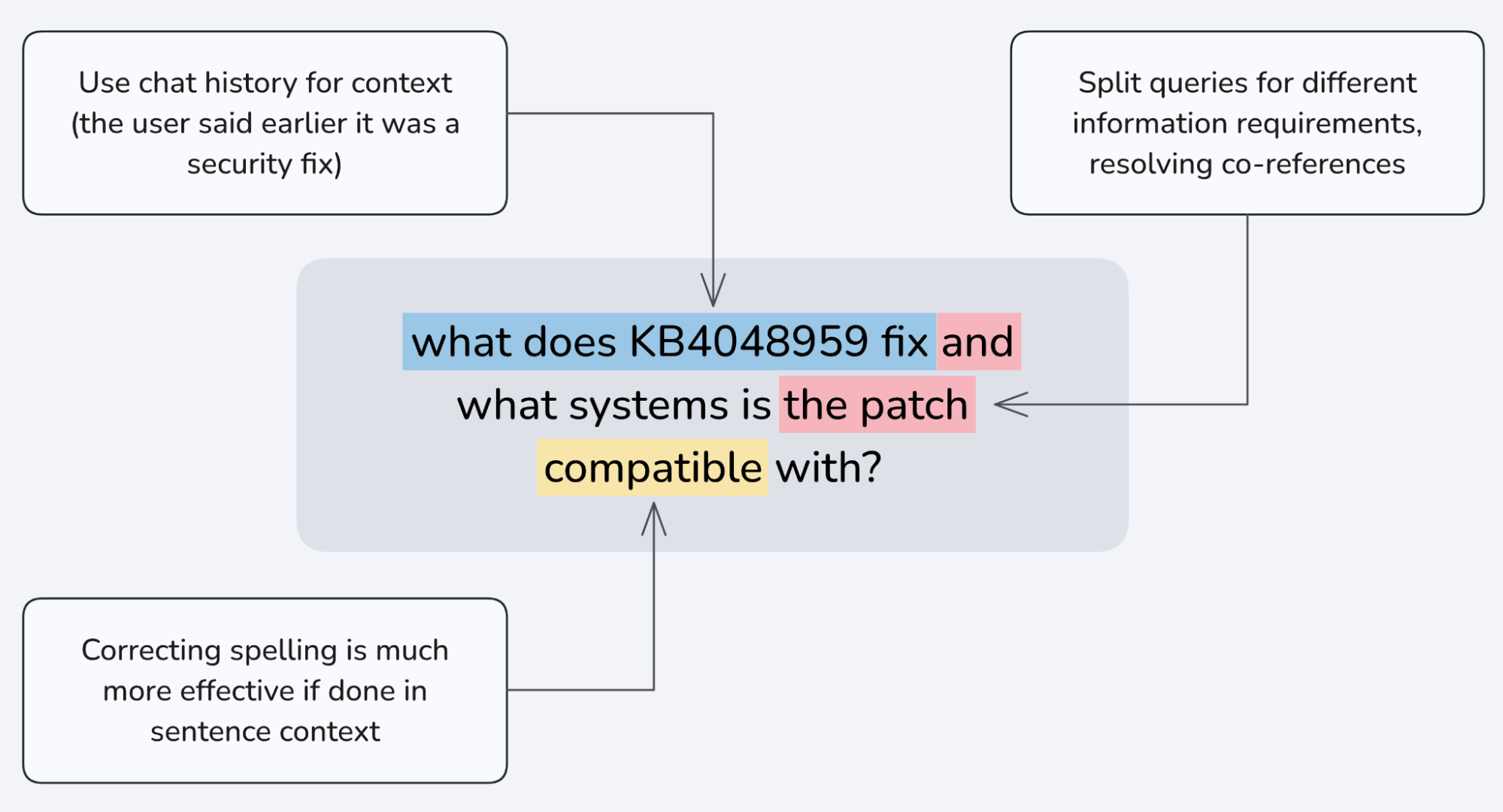
How agentic retrieval reads a compound question before it searches (source)
On Azure, Foundry IQ covers various techniques, including the two mentioned above. You can build a knowledge base on Azure AI Search, over sources such as Microsoft SharePoint or Microsoft OneLake. The knowledge base is exposed as an MCP server, so the agent can search it at any point in a run. That gives you just-in-time retrieval out of the box. You don't need to build the system for it, though Microsoft recommends a short instruction telling the agent to use the knowledge base. For decomposition, its agentic retrieval engine can use a model to split the question into subqueries, with the conversation history as context. It runs them in parallel, then reranks and merges the results.
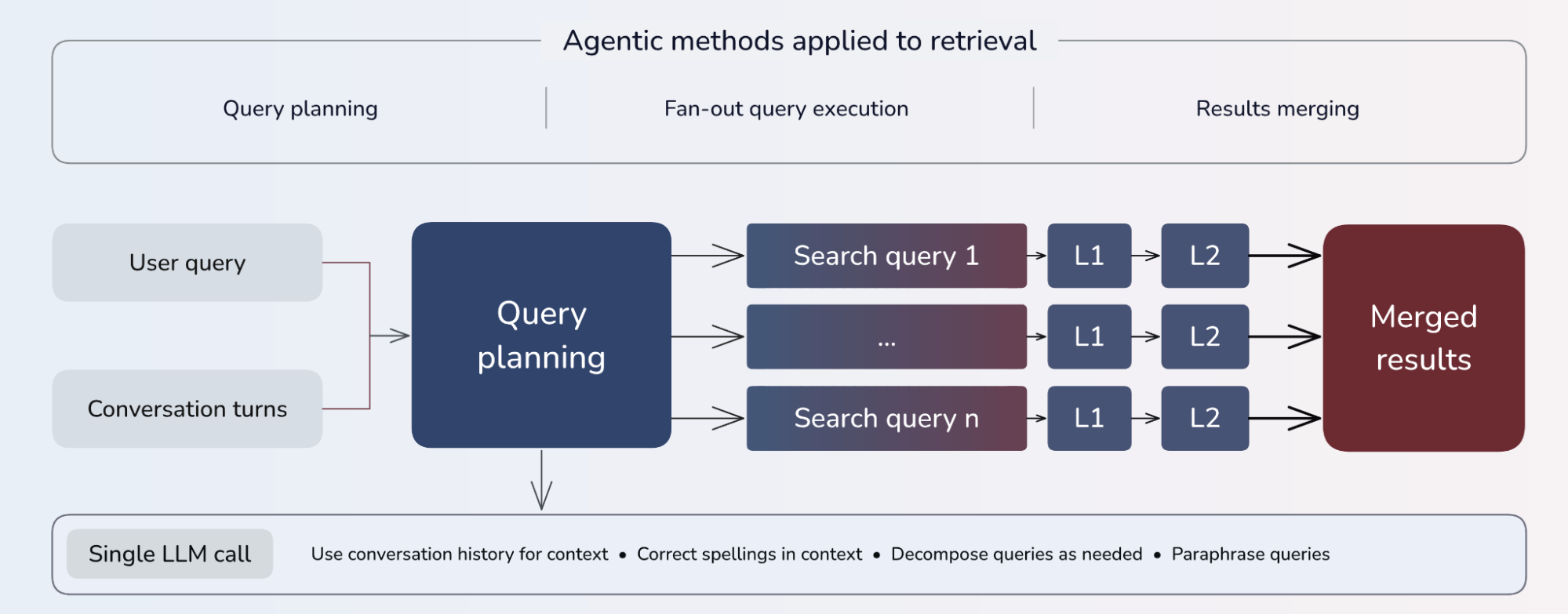
Agentic retrieval in Azure AI Search. (source)
Conclusion
Demo agents can skip the four components in this article, but production agents almost always need them. While each component has various details and lots of different techniques exist to optimize them, we covered some of the most important ones. Once you understand them, you can easily include them in your agent development.
In practice, this comes down to a few habits. Keep the tool list short, and load rare tools only when a task needs them. Trim long tool results, and clean up the history before it outgrows the window. Save short memories instead of whole conversations, and bring back only the ones that matter. Make retrieval a tool, so you retrieve documents as the need arises.
You don't have to build all of this yourself. You can pick a framework of your choice and see how it offers these functionalities. Most frameworks are well-documented and support the discussed techniques. For example, Microsoft Foundry already gives you managed versions of many of these pieces. Toolboxes give you a tool registry with tool search built in. The Azure OpenAI Responses API can compact long conversations for you. Foundry Agent Service includes a managed memory store, and Foundry IQ handles just-in-time retrieval, query decomposition, and even citations.
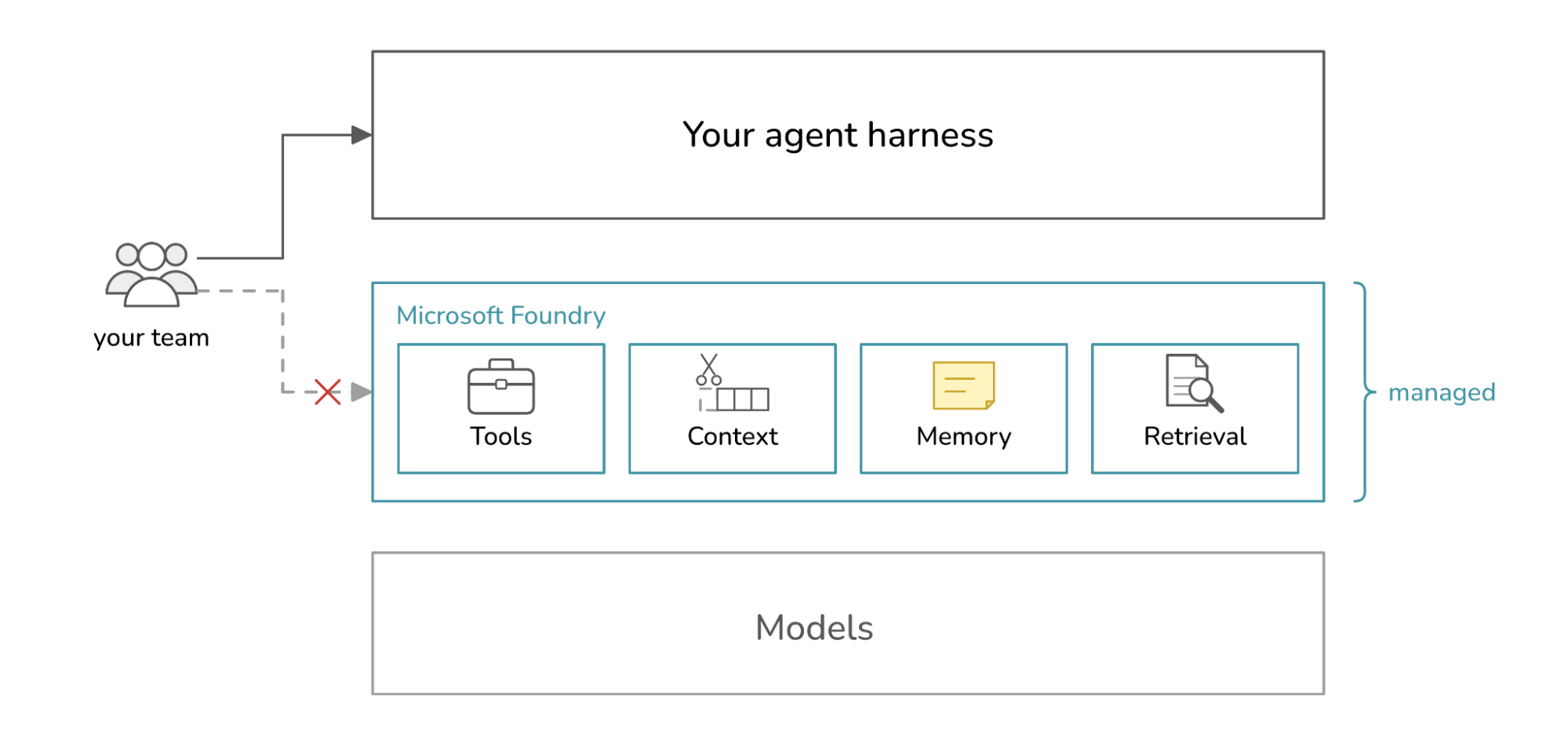
You build the harness. A platform manages foundational features.
It is usually better not to rebuild what already exists and works well. Your team can instead focus on what makes the agent useful and on the important things that need human judgment.
If you're not sure where to begin, trace one real run of your agent and see which part of its context grows first. You can try tracing, toolboxes, memory, and Foundry IQ in Microsoft Foundry.
To learn more about Azure, see why builders are building with Azure. You’ll find stories from teams building on it and the services you can try for free.
References
[1] Introducing advanced tool use on the Claude Developer Platform: https://www.anthropic.com/engineering/advanced-tool-use
[2] Writing effective tools for AI agents: https://www.anthropic.com/engineering/writing-tools-for-agents
[3] Use the Azure OpenAI Responses API: https://learn.microsoft.com/en-us/azure/foundry/openai/how-to/responses
[4] Manipulating AI memory for profit: The rise of AI Recommendation Poisoning: https://www.microsoft.com/en-us/security/blog/2026/02/10/ai-recommendation-poisoning/
[5] Prompt Shields in Microsoft Foundry: https://learn.microsoft.com/en-us/azure/foundry/openai/concepts/content-filter-prompt-shields